
Overview
Cmash Web-to-Publish — Feature Overview
Cmash is a modern Web-to-Publish platform that lets organizations create, customize, and produce brand-compliant documents at scale — from business cards and price labels to invoices and marketing materials.
What Is Cmash?
Cmash is a self-hosted Web-to-Publish solution that bridges the gap between professional document design and everyday business users. Template designers create pixel-perfect layouts with the Typst typesetting language. Designers build Typst templates, end users fill in simple forms, and the platform produces brand-compliant, production-ready PDF, PNG or SVG output, one-off or in bulk in seconds.
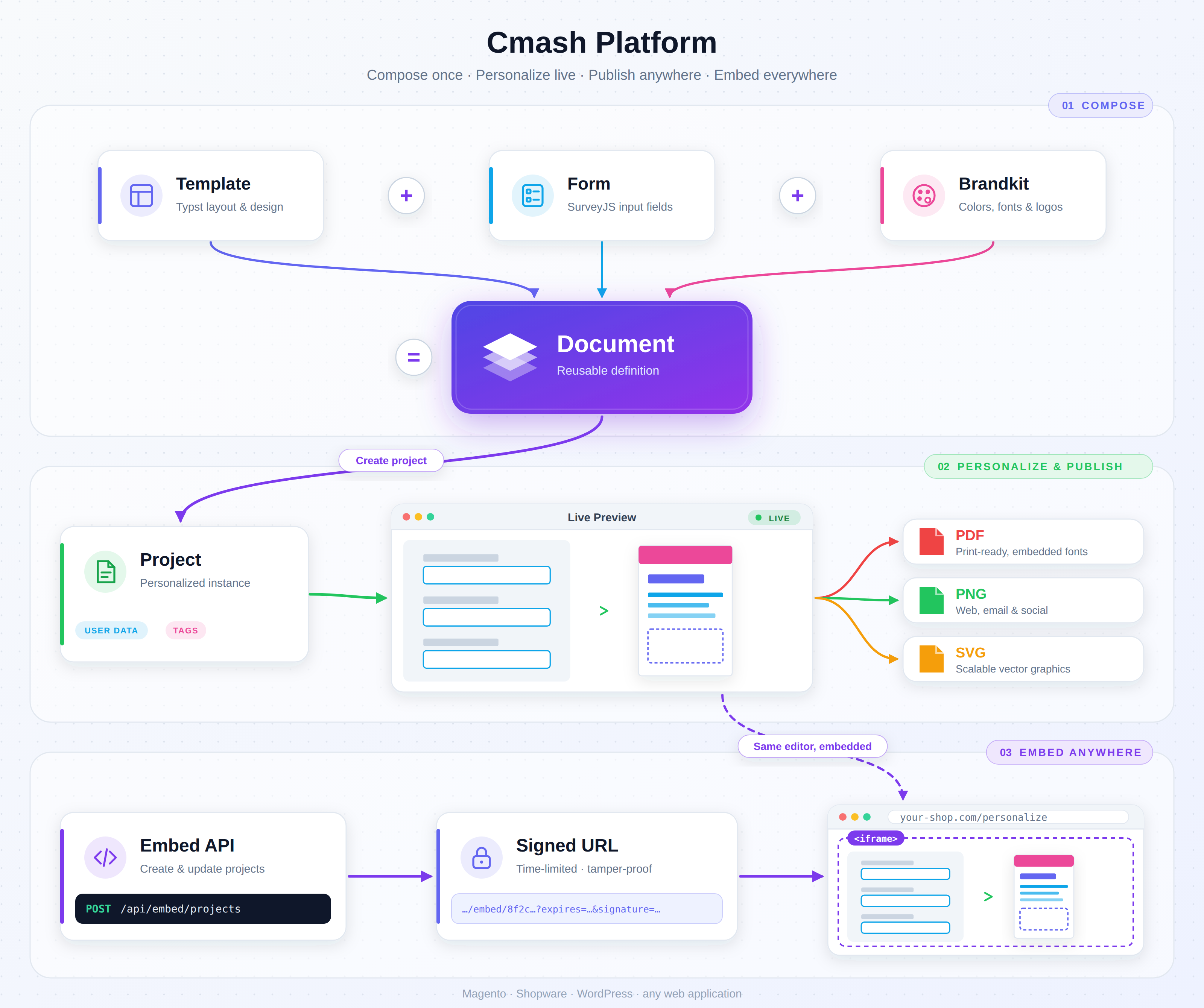
Conceptual Overview
Key Features
Intuitive Document Editor
The browser-based editor gives end users a straightforward experience:
- Form-Driven Input — users fill in text fields, choose from dropdowns, upload images, and select options. No design tools, no learning curve.
- Live Preview — every change triggers an instant, pixel-accurate SVG preview of the final document. What you see is what you get.
- Multi-Page Support — navigate through multi-page documents with page thumbnails and smooth transitions.
- Zoom & Pan — zoom into details or view the full page, with smooth drag-to-scroll navigation.
- Undo/Redo — full history for every change. Never lose work.
- Form Localization — form labels, default values, and dropdown options switch language dynamically based on a user-selected language field. Supports any locale format (
de_DE,fr,IT) — just add"localeField"to the form definition.
Image Management
- Drag & Drop Upload — users upload their own images directly in the form, with instant preview.
- Image Cropping — built-in crop tool with configurable aspect ratios (free, 1:1, 16:9, etc.) ensures images fit perfectly into the template layout.
- Image Library — choose from a curated asset library managed by administrators. Search, filter, and select with a single click.
- External Image Sources — connect to Digital Asset Management (DAM) systems, Product Information Management (PIM) systems, or any REST API. Images are fetched through a secure server-side proxy — no credentials exposed to the browser.
Shared Asset Variants — One Original, Multiple Output Needs
- Keep the Original — retain the uploaded source while maintaining prepared versions for screen and print. No need to overwrite the master to serve a different output channel.
- Configurable Web & Print Types — define named variants with an sRGB target for Web or a printer-specific CMYK profile for Print, including multiple print conditions for the same shared asset.
- Automatic Preparation, Manual Control — generate variants for supported source formats or upload a prepared replacement when a job needs a specific version. Return to automatic processing where supported.
- Preview, Download & Inspect — review variant previews, download prepared files, and see processing errors or outdated variants before relying on them in a job.
- ICC Storage Options — choose Compact or Embed ICC storage, with ICC-equipped downloads for supported variants when a self-contained file is needed.
- Renderer-Specific Selection — choose the shared-asset variant type per output renderer or inherit the platform defaults. Use Web variants for SVG/PNG and Web or Print variants for PDF without changing the template's asset references.
Variant selection applies to the shared asset library; it does not automatically convert template colors, user uploads, or externally fetched images.
Snippet Drag & Drop
- Draggable Content Blocks — template designers define drop zones in the layout. Users drag snippet cards (e.g., contact persons, product variants) onto specific areas of the preview.
- Data-Rich Snippets — each snippet carries structured data that populates template variables on drop.
- External Snippet Sources — load snippet cards from CRM, PIM, or any API via the datasource system.
Data Collections & Batch Processing
- Batch Documents — create hundreds of personalized documents from a single template. Each item in a data collection gets its own compiled output (e.g., 500 business cards with different names).
- Collection Navigator — browse, add, edit, and remove individual items in a data collection through an intuitive navigator UI.
- CSV Import — import data collections from CSV files for mass production runs.
- Per-Item Fields — mark specific form fields as "collection" fields that vary per item, while shared fields (logo, company address) stay the same across all items.
- ZIP or Combined PDF — download individual outputs in a ZIP archive or join successful PDF items into one file in collection order. Configured per PDF renderer, with combined output available when the server's PDF merge capability is enabled; non-PDF batches use ZIP.
- Progress Tracking — monitor batch compilation progress in real time.
Preflight Check — Catch Problems Before They Hit Print
- One-Click Validation — the "Preflight Check" button validates the entire document in one step: form fields, data collection, and template-level checks — all in a single overlay.
- Form Validation — ensures all required fields are filled, text lengths are within limits, and field-level validators pass (powered by SurveyJS built-in validation).
- Data Collection Checks — validates minimum and maximum row count requirements (e.g. "at least 2 items required"). Configurable per form definition.
- Document Errors — templates can define their own validation rules using
#cmash-preflight-error("message", field: "fieldname"). When text overflows a frame, content exceeds limits, or any custom condition fails — it surfaces as a red error in the preflight dialog. - Document Warnings — advisory messages via
#cmash-preflight-warning("message", field: "fieldname")for non-blocking issues (low image resolution, recommended limits exceeded). Shown in yellow — informational, doesn't block output. - Real-Time Indicators — red ⚠ and yellow ⚠ badges appear in the editor toolbar immediately after each preview render. No extra compile step — errors are detected from the live SVG preview.
- Click-to-Detail — clicking any badge opens the full preflight dialog with all issues listed.
- External Integration — shop systems can call
preflightCheck()via the Penpal bridge before "Add to Cart" to block invalid documents from entering the checkout flow. - Smart Text Fitting — the bundled
@local/cmash-framefitpackage auto-fits text into fixed frames. Instead of crashing on overflow, it renders at minimum size (clipped) and reports a preflight error — so the document always previews, and the user gets a clear message about what to fix.
Brand Compliance
- Brandkits — define brand identities with colors, fonts, and logos. Brandkit values are automatically injected into every template, ensuring consistent brand application across all documents.
- Print-Ready Color Definitions — define brand colors in CMYK, RGB, Hex, HSL, or Luma with alpha support. Colors flow directly into templates — what marketing defines is what gets printed. No color code lookups, no guesswork.
- Phrases & Translations — manage recurring text (slogans, legal lines, claims) centrally in the brandkit with built-in multi-language translations. Change a phrase once — every document using it updates instantly. Non-designers manage wording through a simple admin form, no template editing needed.
- Multi-Language Management — define available languages centrally in settings and assign them to individual groups. Phrases, form labels, and design tokens automatically adapt to the configured languages — ensuring every group speaks the right languages without manual per-template configuration.
- Multi-Group Support — manage multiple groups with different visual identities. Switch between brandkits without changing the template.
- Custom Fonts — upload and manage brand-specific fonts. Fonts are automatically available to the rendering engine.
- Editor Themes — customize the editor UI itself with brand colors and styles. Each workspace can have its own look and feel, matching the host application or corporate identity.
Color Profiles — Manage the Conditions Behind Your Colors
- Central ICC Library — keep the profiles used for asset color preparation in one searchable, manageable place instead of passing files between operators.
- Bring Your Printer's Profile — import
.icc/.icmfiles or ZIP archives, inspect the detected profiles, and select those required for your workflow. - Technical Details Without Retyping — color space, component count, ICC version, and internal profile name are read from the file. Record paper/substrate, total ink coverage, and press-condition information alongside them.
- Traceable & Unchanged — preserve original profile bytes with integrity verification and keep vendor, license, source archive, and redistribution details attached to each record.
- Screen Target Included, Print Target Chosen by You — sRGB is bundled for Web variants. CMYK profiles are supplied by the operator for the actual printing condition; none are bundled or automatically downloaded.
- Reusable Across Asset Types — apply the same managed profile to configured Print variants and control availability and profile defaults centrally.
Color profiles and prepared assets support a controlled production workflow; they do not alone guarantee whole-document color conversion or PDF/X compliance. Final output, including merged PDFs, must be validated for the required standards.
Tagging & Organization
- Color-Coded Tags — create tags with custom colors to categorize assets, documents, templates, and forms. Instantly see what belongs where with tinted badge indicators.
- Hierarchical Tags — organize tags in parent-child trees (e.g. "Campaign A → Sub-Campaign 1"). Child tags show their lineage on hover for quick context.
- Cross-Entity Tagging — assign the same "general" tags across different entity types, or use type-specific tags scoped to assets, documents, templates, or forms.
- Tag-Filtered Admin Lists — filter any tagged entity list by tags in the admin panel. Find all assets for "Campaign A" or all templates tagged "Invoice" in one click.
- Tag-Filtered Asset Library — filter the built-in asset library by tags in the editor's image chooser modal. Form designers specify
datasourceParamsto pre-filter which assets end users can choose from. - API Tag Filtering — filter any entity via REST API with
?tags=slug1,slug2. The_assetsdatasource supports tag filtering for programmatic asset selection. - Inline Tag Creation — create new tags directly from any entity's edit form without leaving the page.
- Auto Tag Population — when projects are created from documents (via admin or API), all document tags are automatically inherited. Campaign labels, client tags, and categories flow through without manual re-tagging.
- Tag Management — full admin CRUD for tags with color picker, type selector, parent assignment, and tree visualization.
Flexible Project Data Model
- Form Data (
data) — all user-entered form values stored as a flat JSON object, directly accessible in templates viadata.json. Simple, clean, and instantly available to the rendering engine. - Data Collections (
data_collection) — an optional array of per-item records for batch processing. Each item overrides specific fields while sharing common data (company logo, footer text). Perfect for mail merges, badge batches, or label runs with hundreds of personalized variants. - Private Data (
private_data) — server-side only context that is never exposed to the browser. Store API keys, tenant identifiers, ERP references, or datasource parameters securely. Available to hooks, datasources, and server-side logic — invisible to end users.
Data Definitions — Structured Data Contracts
- Formal Field Declarations — define exactly what data a template expects: field names, types (string, number, boolean, date, image, array, object), translatable labels, default values, required flags, and collection markers.
- Nested Structures — support complex data like invoice line items, addresses, or product arrays with up to 2 levels of nested objects/arrays.
- Headless-Ready — external systems query the schema API to discover expected fields before sending data. No guesswork, no mismatched field names — just a clear machine-readable contract.
- JSON Schema Export — auto-generate industry-standard JSON Schema (draft 2020-12) from any Data Definition for validation tooling and code generation.
- Auto-Generated Variables — all defined fields are automatically available as
#letvariables in Typst templates at compile time. No manual wiring needed. - Group-Scoped Translations — labels and defaults use translatable inputs scoped to the linked group's languages, keeping translations focused and manageable.
- Source-Independent — works alongside forms, datasources, or completely standalone for headless API integrations. The Data Definition is the single source of truth regardless of how data arrives.
Multi-Tenant Workspaces
- Workspace Isolation — separate documents, templates, and projects by business unit, client, or department.
- Per-Workspace Configuration — each workspace has its own available output formats, default brandkit, editor theme, and form layout preferences.
- Role-Based Access Control — fine-grained permissions per user and resource type, powered by Filament Shield with auto-generated policies.
Task Management & Status Workflow
- Assign To — assign any form, template, or document to a team member. See at a glance who's responsible.
- Configurable Statuses — define your own workflow statuses (Open → In Progress → Finished) with colors and icons that match your process.
- My Tasks Dashboard — every user gets a personal "My Tasks" page showing all items assigned to them — across forms, templates, and documents — with live status badges and quick links.
- Navigation Badge — the task count appears as a badge in the sidebar, so nothing gets overlooked.
- Translatable Labels — status names support multiple languages out of the box (e.g. "Offen" / "Open").
Translatable Fields
- TranslatableTextInput — reusable Filament form component for multi-language string values. Shows primary locale with a 🌐 expand button and filled-count badge (e.g. "2/4"). Works with Spatie HasTranslations and plain JSON columns.
Package & Snippet Import System
- Centralized Import Management — brandkits and templates can select Typst community packages (e.g.
@preview/tiaomafor barcodes) and code snippets (e.g.format-price,tech-table) from the admin panel. Selected imports are auto-injected as#importstatements in the template preamble at compile time. - Three Import Modes — each import supports Module (
tiaoma.barcode()— no conflicts), All * (barcode()— quick access), or Pick specific (barcode, qrcode— explicit). An in-app help modal explains each mode visually. - Export Parser — a 🔍 button scans package entrypoints or snippet source code, detects all exported
#letdeclarations, and presents them as selectable options for cherry-pick imports. - Brandkit → Template Inheritance — brandkit imports cascade to all linked templates automatically. Templates can extend or override individual imports without affecting the brandkit.
DataChooser — Interactive Data Selection
- Full-Screen Selection Modal — end users browse, search, and select data from configured datasources via an interactive table interface with search and selection panels.
- Inline Editing & Validation — edit selected rows directly in the table with cell-level regex validation and translatable error messages.
- Smart Duplicate Handling — warns when re-selecting existing rows with skip/update options.
- Synchronize — refresh selected data against the latest source while preserving user edits.
- Dynamic Data Loading — datasource URLs with
{fieldname}placeholders resolve from current form data (e.g. language selection drives which product catalog loads). - Conditional Activation —
enable_datachoosertoggle controls whether collection data is auto-loaded or user-selected.
User Data Collections
- Save & Reuse Selections — users save their DataChooser selections as named collections (e.g. "Q3 Dealer List") for repeated use across sessions.
- Load & Delete — previously saved collections can be loaded back or removed at any time.
- Admin Management — full Filament CRUD resource for browsing, viewing, and managing all saved user data collections with item count and creator tracking.
External System Integration
- Embed API — create projects and embed the editor into any web application via signed, time-limited URLs. No admin login required for end users.
- iframe Embedding — embed the full editor into Magento, Shopware, WordPress, or any custom application with a simple
<iframe>. - Penpal Communication — parent applications can programmatically set/get form data, control zoom, and trigger actions via the Penpal iframe bridge.
- REST API — full programmatic access to all entities (documents, projects, templates, forms, workspaces, assets) via Sanctum-authenticated endpoints.
- Auto-Generated API Docs — OpenAPI documentation generated automatically for easy integration.
Professional Document Output
- Typst Rendering Engine — documents are compiled using Typst, a modern typesetting system that produces professional-quality output rivaling LaTeX — but with a simpler, more approachable syntax.
- Multiple Output Formats — PDF for print, PNG for web/email, SVG for scalable graphics. Configure available formats per workspace.
- Production-Ready PDFs — output suitable for professional printing with precise typography, vector graphics, and embedded fonts.
- Fast Compilation — typical compilation in under 2 seconds, even for complex multi-page documents.
Datasource Connectivity
Connect any external system to your forms — securely, flexibly, and without writing code.
- DAM Integration — connect to Digital Asset Management systems (Bynder, Celum, Canto, NP Portal, or any custom DAM) and let users browse and select images directly in the editor form.
- PIM/CRM Integration — load product data, contact information, snippet libraries, or any structured data from external APIs into form dropdowns, image pickers, and snippet panels.
- Zero-Credential Exposure — all external API calls go through an authenticated server-side proxy. API keys, bearer tokens, OAuth2 secrets, and basic auth credentials are stored with AES-256 encryption and never reach the client browser.
- JMESPath Transformation Engine — reshape any API response into the exact format your form widgets expect using powerful JMESPath expressions. No code, no middleware — just a one-line expression that maps complex nested JSON into clean, flat results.
- Private Data Context — pass secure, server-only identifiers (company IDs, user tokens, tenant keys) from your backend to datasource fetchers without ever exposing them to the browser. Perfect for per-user or per-company asset retrieval.
- Interactive Test Environment — every datasource has a built-in split-panel test page: tweak parameters, edit JMESPath expressions, and see raw vs. transformed results in real time — all without saving or deploying anything.
- Dynamic Form Parameters — form fields can drive datasource queries in real time. When a user selects a product category, the image picker automatically refreshes to show only matching assets. Template syntax (
{fieldname}) makes this configuration trivial. - Extensible Plugin Architecture — need multi-step OAuth flows, holder resolution chains, or custom caching logic? Register your own datasource type as a simple addon package. The NP Portal integration ships as a reference implementation.
- Built-In Asset Library — the
_assetsvirtual datasource provides instant access to all shared assets with tag filtering — zero configuration required. - Authenticated Image Proxy — serve images from credential-protected sources through a secure proxy with host validation and SSRF protection. Users see the images; credentials stay on the server.
- Static JSON Support — for simple use cases, store data directly in the datasource configuration. No remote call needed — ideal for fixed dropdown options or snippet libraries that rarely change.
- Multiple Auth Methods — supports Bearer tokens, Basic auth, and custom API key headers out of the box. Credentials rotate seamlessly without touching form definitions.
Template Design
- Typst Templates — designers write templates in Typst, a modern markup language for professional documents. Clean syntax, powerful layout capabilities, and a growing community package ecosystem.
- Live Template Editor — edit Typst source code alongside a form and live preview, all in one browser-based workspace. See changes instantly.
- Community Packages — install and use Typst community packages (tables, charts, barcodes, QR codes, etc.) directly from the admin panel.
- Local Package Support — install custom Typst packages from GitHub URLs or ZIP uploads for packages not available on Typst Universe. Local packages use the
@localnamespace and are immediately available in templates. - Variable System — templates access form data through multiple injection methods:
#letvariables,{{placeholders}}, CLI inputs, and structureddata.json— choose what fits best. - Template Elements & Design Tokens — a unified panel in the admin and template editor shows all available tokens: brand colors, custom template colors, fonts, multilingual phrases, and auto-generated form variables — each with type indicators and one-click copy. At compile time, dedicated files (
template-colors.typ,template-fonts.typ,template-phrases.typ,template-variables.typ) are auto-generated and auto-imported, so every token is immediately usable in the template with zero manual wiring. - Preview vs. Production Mode — templates can render differently in preview (with drop targets, placeholders) and production (clean, final output).
Administration
- Filament Admin Panel — modern, responsive admin interface for managing all aspects of the platform: users, templates, forms, documents, projects, workspaces, groups, assets, fonts, renderers, and datasources.
- Enduser-View & Admin-View — open any project in two modes: Enduser-View shows the editor exactly as end users see it; Admin-View is always available and uses a dedicated admin form/workspace if configured, or automatically unlocks the standard form by stripping all
readOnlyandvisible: falserestrictions — so admins can always inspect and edit every field without needing a separate form definition. Admin mode is secured server-side (requires authenticated admin session) and cannot be activated by end users or external embeds. - Dashboard Analytics — visual charts and stats for projects, compilations, assets, and templates at a glance.
- My Tasks — personal overview of assigned forms, templates, and documents with status indicators and direct links.
- Status Management — define and customize workflow statuses under Settings with translatable names, Filament colors, and Heroicons.
- User Management — create users, assign roles, manage API tokens, and control access with fine-grained permissions.
- Compilation History — track every compilation with status, duration, output, and error details. Diagnose issues quickly.
- Batch Monitoring — view and manage batch compilation jobs with item-level progress tracking.
- Used By Cross-References — key entity edit pages show a collapsible "Used By" section revealing which other entities depend on it. See at a glance which documents use a specific form, which templates reference a brandkit, or which workspaces use a renderer — with badge counts, direct links, and tabbed navigation. No more guessing about dependencies before making changes.
- Protected System & Sample Entities — platform-provided entities ("System") and reference examples ("Sample") are clearly labeled and read-only for normal users. All fields appear greyed out with a blue info banner — users can view and copy values but not modify or delete them. A "Duplicate" button lets users create their own editable copy instantly. Administrators with the right permission retain full edit/delete access.
Revision History — Track Changes, Rollback Anytime
Every change recorded. One click to restore.
All key entities — templates, forms, brandkits, documents, workspaces, renderers, datasources, editor themes, hooks, tags, and more — automatically track a full revision history. Every save creates a versioned snapshot, so you can see exactly who changed what and when. The revision view highlights only the fields that actually changed, with unchanged properties collapsed out of the way. Need to undo a mistake? Restore any previous version with a single click. Administrators can configure a maximum number of revisions per entity (or keep unlimited) and bulk-clean old revisions older than a configurable number of days — keeping the database lean without losing important history.
How It Works
- Design — Template designers create Typst layouts and SurveyJS form definitions in the admin panel.
- Configure — Administrators set up groups, workspaces, renderers, and datasources.
- Compose — A Document links a template + form + brandkit together.
- Create — A Project is created (manually or via API) as an instance of a document.
- Edit — End users open the editor, fill the form, upload images, and see live preview.
- Produce — One click generates production-ready PDF, PNG, or SVG. Batch mode delivers individual files in a ZIP or, for configured PDF renderers, one combined PDF.
Architecture Highlights
- Modular Package Design — independent packages, each responsible for a specific domain. Add or remove capabilities without affecting the core.
- Modern Stack — Laravel 13, Filament 5.5, Tailwind 4, Vite 8, PHP 8.3+.
- Self-Hosted — runs on your own infrastructure. Full control over data, security, and customization.
- Docker-Ready — production deployment via Docker Compose, local development via DDEV.
- API-First — every feature accessible via REST API with Sanctum authentication and auto-generated OpenAPI documentation.
- Secure by Design — encrypted credential storage, SSRF-protected proxies, signed URLs, role-based access control, and iframe origin restrictions.
Cmash Web-to-Publish — Professional documents, created by anyone, at any scale.