Template Package
Cmash Template — Feature Overview
Design once, produce endlessly — the template layer that turns brand, form and layout into a reusable document blueprint.
What Is Cmash Template?
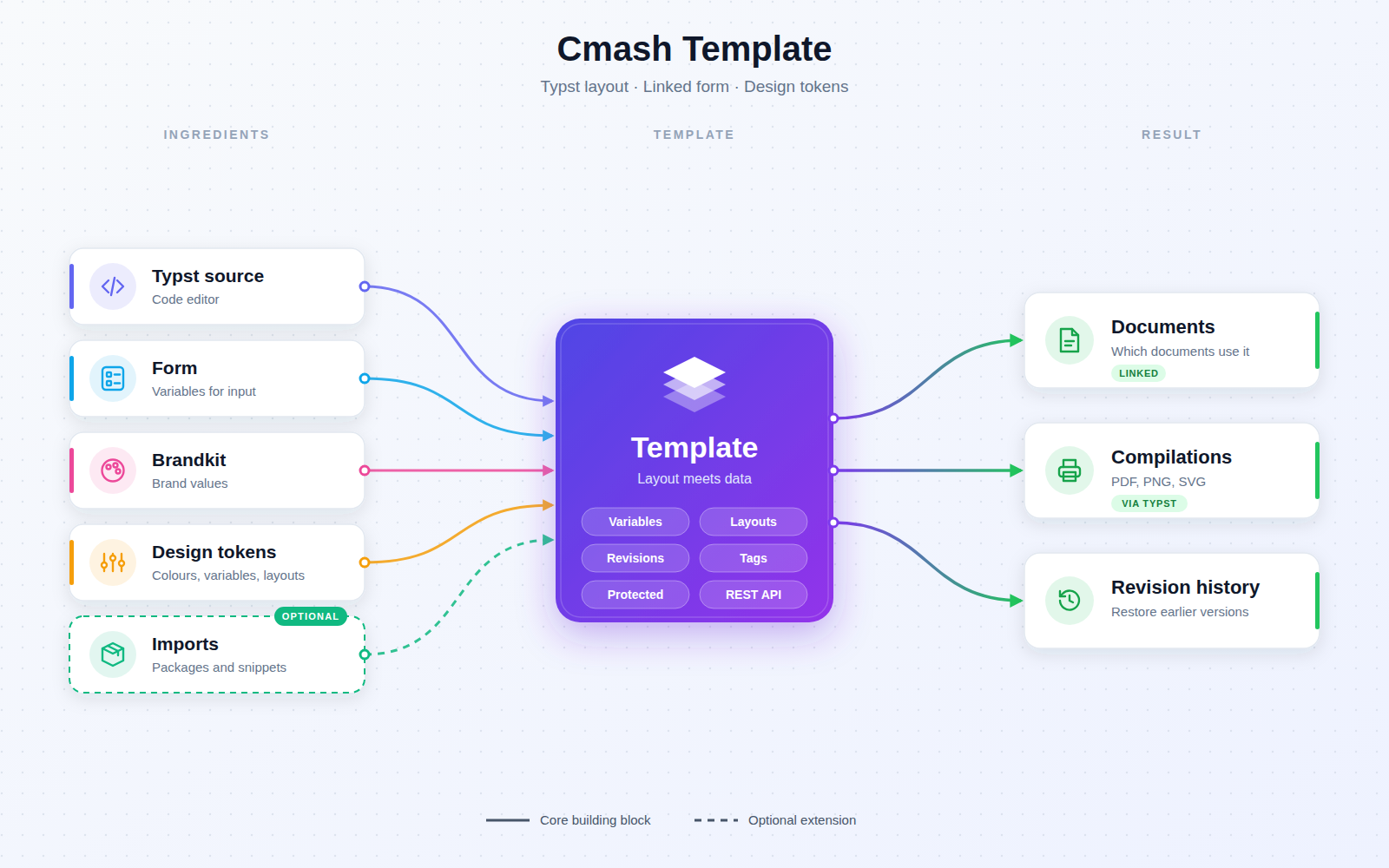
Cmash Template lets your team define document templates in the admin panel: the Typst source, the form users fill in, the brand it follows, and the design building blocks (colours, fonts, images, phrases, variables) it may use. Templates are then used by documents and rendered by your chosen renderers. Content and brand teams can set up templates without touching code where possible.
Key Features
One Place to Define a Template
- General settings — name, slug, description, tags, active switch, language and layout selection, group, status and assignee.
- Linked Form and Brandkit — pick the form users will fill out and the brandkit the template follows; shortcuts jump straight to the linked form, brandkit or group.
- Template content editor — a code editor for the template source.
- Live overview of available variables — see which variables come from the linked form (with field-type icons such as Text, Dropdown, Checkbox, Image, Rating, Slider, Multi-Select) and which come from the brandkit.
Design Tokens per Template
Tabs for Colors, Assets, Fonts, Phrases/Translations, Variables, Layouts, Packages and Snippets add template-specific elements on top of what the brandkit already provides. Brandkit colours, packages and snippets are shown as inherited, so you always see what is already in place.
- Custom colours — with colour picker; items can be copied within the list.
- Variables — as Typst expressions, with an Import Variables action to copy all variables from another template.
- Packages and snippets imports — choose a package or snippet, an import mode, and pick exactly which functions to import (the exports are read for you).
- Layouts — with page size, margin and bleed values.
Revisions and Origin Protection
- Revision history — a page per template.
- Origin protection — templates whose origin is not editable are protected from changes in the editor.
Linked Documents at a Glance
- Impact overview — a relation panel shows which documents currently use a template (or tells you none do), so you know the impact before changing it.
Integrations & API
Authenticated (Sanctum) endpoints to list, create, read, update and delete templates under /templates. Create accepts name, slug, description, content, workspace and renderer assignments.
Permissions & Dependencies
- Requires PHP ^8.3, Filament ^5, Laravel Sanctum and the CMAsh packages cmash, cmash-layout, cmash-workspace, cmash-code-editor and cmash-tag.
- Form and Brandkit linking use the CMAsh form and brandkit packages; assets use cmash-asset.
- Group-based visibility follows the platform's group scoping. The admin resource is in the Configuration navigation group.
- No package-specific roles or permissions are defined.
Configuration
This package has no config/ file and defines no environment variables.
| Item | Value | Meaning |
|---|---|---|
| Editor link route prefix | cmash-editor.route_prefix (default cmash) |
Provided by the cmash-editor package; used by the editor links |
Use Cases
- Brand-consistent documents — one template per document type, following the brandkit.
- Self-service forms — link a form so users fill in fields that feed the template variables.
- Safe changes — check linked documents and revision history before editing a live template.
- Organised template library — sort by group, tag, status and assignee.
- Reuse — import variables from another template instead of rebuilding them.
Cmash Template: design once, produce endlessly.