
How Cmash can your Marketing Department!
Cmash — Features Explained for Marketing Teams
Cmash is a self-hosted Web-to-Publish platform. Designers build a layout once, your colleagues, partners or customers fill in a simple form, and Cmash produces brand-compliant PDF, PNG or SVG files, one at a time or in bulk.
This guide describes every Cmash feature in plain language. Each feature has a purpose (what it is for) and a benefit (how it helps your marketing work).
How to read this guide
- The Big Picture
- Creating Documents
- Brand Control
- Images and Files
- Forms and Data Entry
- Producing Output
- Connecting Cmash to Your Shop or Portal
- Working Together
- Administration
- Template Design (for your designers)
- Typical Use Cases
- Scope of This Guide
1. The Big Picture
From design to download in six steps
Purpose: Cmash splits the work of producing documents into clear roles, so nobody has to do someone else's job.
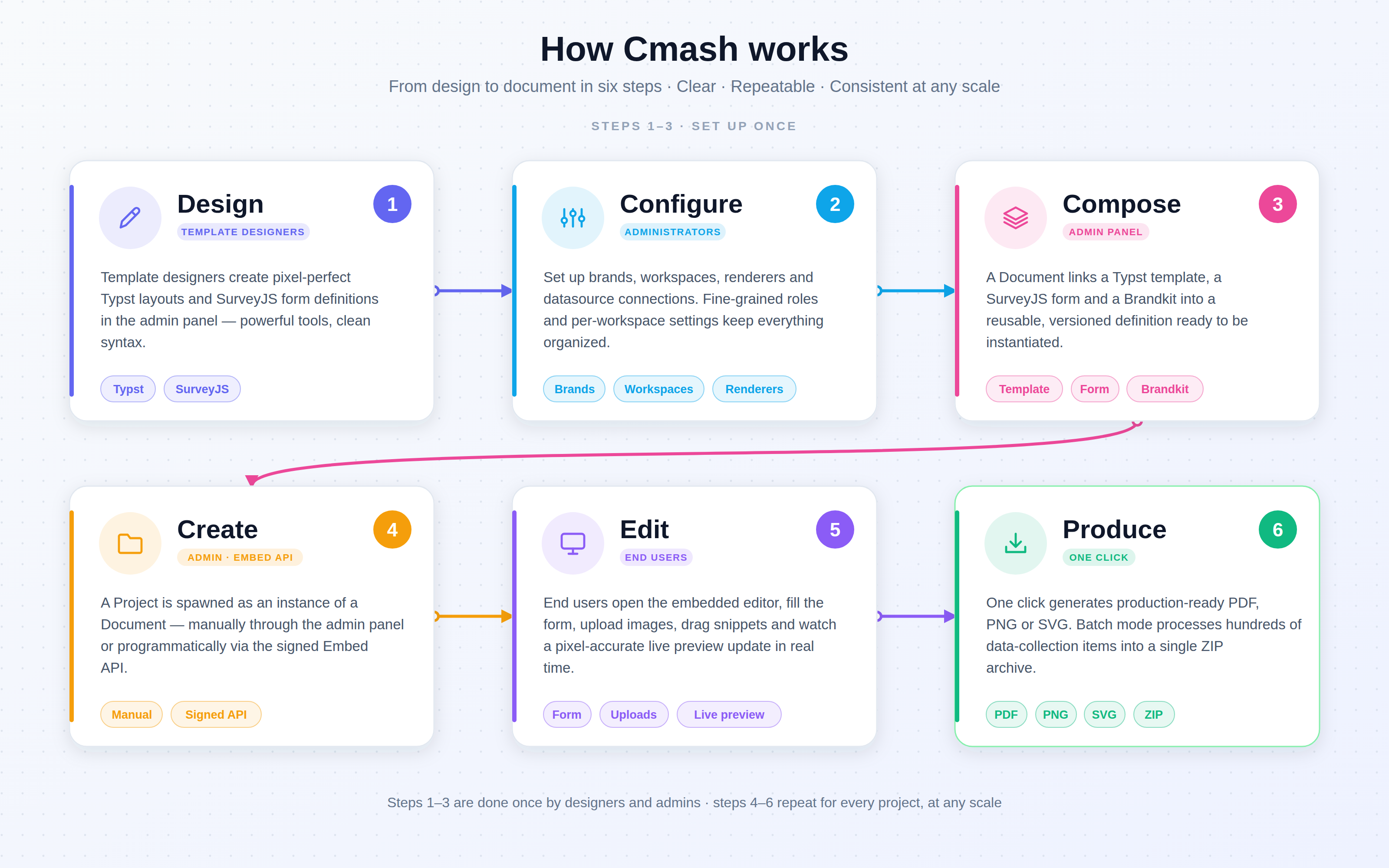
- Design: designers create the layout (template) and the input form.
- Configure: administrators set up brands, brand kits, workspaces and output types.
- Compose: a document combines template, form and brand kit.
- Create: a project is started from the document, by hand or by another system.
- Edit: the end user fills in the form and sees a live preview.
- Produce: one click creates PDF, PNG or SVG.
How it helps you: Marketing keeps control of the look and the wording. Everyone else only touches the fields you allow. Your design team builds each layout once instead of re-doing it for every request.
The building blocks
| Building block | In one sentence |
|---|---|
| Template | The layout, including the places where content goes. |
| Form | The questions a user answers (text, choices, images …). |
| Brand kit | Your colours, fonts, logos, slogans and legal lines. |
| Workspace | A setup for a team or brand: which outputs and which editor look. |
| Document | A ready-to-use product made of the four items above. |
| Project | One personal copy of a document with its own data. |
| Output | The finished PDF, PNG or SVG. |
2. Creating Documents
Documents: ready-made starting points
Purpose: A document bundles a template, a form, a brand kit and a workspace into one named item with a description and a preview image. It is what your users pick from.
How it helps you: You offer a curated catalogue (flyer, badge, letter) instead of a blank page. Users start in one click, and the result is always built on approved ingredients. Documents can be limited to certain languages, tagged for easy finding and switched between Published and Unpublished, so unfinished work never reaches users.
One-click project creation
Purpose: From a document, a single click creates a personal project that already carries the template, form, brand kit, group and tags, and opens the editor.
How it helps you: No setup steps for the user and no chance of picking the wrong template.
Projects: a personal copy for every job
Purpose: A project is one person's (or one system's) filled-in version of a document. It holds the entered data, can be edited again later and can be turned into output at any time.
How it helps you: Work can be paused and resumed. Projects have the states Temp, Draft and Finished, so you can tell at a glance what is still in progress. When a project is deleted, its generated files are removed as well, which keeps storage tidy.
Private project data
Purpose: Projects can carry information that stays on the server and is never sent to the user's browser, for example a customer number or a shop order reference.
How it helps you: Your systems can link a project to an order or a person without exposing that data in the editor.
Many outputs from one project (batch work)
Purpose: A project can hold a whole list of items, for example 200 attendee names. Each item overrides the shared fields (such as a logo or address) with its own values.
How it helps you: You produce a full print run from one project instead of 200 manual ones. Results come as a ZIP of individual files, or as one combined PDF where the output type and server setup support it.
Test export for offline checks
Purpose: A project can be exported as a package with its source, assets, fonts and data.
How it helps you: Support or production teams can reproduce an issue offline without needing live access.
Compilation history
Purpose: Every time Cmash produces an output, it records the status, duration, result and any error message, for single outputs and for batches.
How it helps you: You can see what was produced, when, and why something failed, which makes questions like "did the print file get created?" easy to answer.
3. Brand Control
Brand kits: your identity in one place
Purpose: A brand kit stores your brand's building blocks and feeds them into every template that uses it:
- Colours in CMYK, RGB, Hex or Luma
- Logos and images from the asset library
- Fonts
- Phrases such as slogans, legal lines and claims, with translations
- Variables for custom values
- Imports of ready-made layout building blocks
How it helps you: Change a colour or an address once, and every linked template and document updates. You can keep several brand kits per brand (for example light, dark and print). Result: brand consistency without chasing individual files.
Phrases and translations
Purpose: Slogans, disclaimers and similar texts are written once in every language and referenced by a key.
How it helps you: Marketing can fix a typo or update a legal line without a designer. All documents use the new wording the next time they are produced.
Groups: brands, teams and tenants
Purpose: Groups separate content by brand, country, department or client. A group has a name, logo, languages and a default language. Users can be limited to certain groups, and an optional switcher in the top bar narrows every list to one group.
How it helps you: Each team sees only its own material, so partners and regional teams cannot pick up the wrong brand. Items without a group stay visible to everyone, which suits shared resources.
Workspaces: a setup per team
Purpose: A workspace decides which output types are available and how the editor looks: sidebar width (from compact to form-only), theme and whether a Save button is shown.
How it helps you: You can give a form-heavy product a wide sidebar and a simple product a form-only view, or limit a department to the outputs it actually needs.
Multilingual by design
Purpose: Content languages and a default language are set centrally. They can be narrowed per group, brand kit, form and document. Text fields everywhere offer a main language plus translations, and the admin interface language can be restricted.
How it helps you: One document can serve several markets, and each market only sees the languages that apply to it.
4. Images and Files
Shared asset library
Purpose: The asset library is your central store for approved logos, product photos, icons, backgrounds and artwork. Each file is referenced by a readable name (slug) in templates. It records size, resolution, colour space and (for PDFs) page count, and generates a preview even for formats browsers cannot show, such as TIFF, HEIC, PSD and PDF.
How it helps you: Everybody uses the same approved image. When you replace a file with a newer version, every template using it stays intact and the file is updated everywhere. You can also retire an asset without deleting it.
Screen and print versions from one upload
Purpose: From one original, Cmash prepares an sRGB version for screens and a CMYK version for each printing condition you use, converting with ICC colour profiles. Each version shows a status: pending, ready, stale or failed.
How it helps you: Your team uploads once instead of preparing separate screen and print files. When the original or the colour setting changes, the affected versions are rebuilt automatically.
Note: colour handling supports your print workflow, but it does not replace checking the output against your printer's requirements.
Manual override of a version
Purpose: You can upload a hand-prepared replacement for any version, and Cmash will never overwrite it automatically.
How it helps you: If a retoucher has produced a perfect print file, it is kept as is.
Choosing the right file at output time
Purpose: Cmash picks the right version based on the output type (for example the screen version for a web PDF and the print version for a press PDF). An ordered fallback list decides what happens if a version is missing, and missing versions can be generated on demand.
How it helps you: The same template gives the right image quality for each purpose without any change to the template.
Quality checks on upload
Purpose: Cmash checks minimum resolution (default 300 DPI), minimum size (100 × 100 pixels), allowed colour spaces and PDF page count.
How it helps you: Low-quality images are flagged early instead of showing up as a blurry print.
Automatic folder imports
Purpose: Scheduled import jobs read a folder on the server, wait until files are fully written, then add them to the library and apply tags and group automatically. Failed files go to an error folder, and everything is logged.
How it helps you: Agencies or photographers can drop files into a folder and they appear in the library, correctly organised, without manual work.
Customer uploads, checked and made print-ready
Purpose: Files uploaded by end users are stored separately from your approved assets. Cmash checks the real file type (not just the name), reads size, resolution and colour information, and creates a preview. If no colour profile can be assumed, the user is asked to confirm one. Print versions are generated, and the original is always kept. Error messages are written for customers, in English and German.
How it helps you: Customers can personalise products with their own logos or photos, and you reduce files that cannot be printed. Administrators can reprocess old uploads after a pipeline change or remove all uploads of one person on request.
Job queue monitor
Purpose: Super administrators can see pending, failed and batched background jobs, retry or remove failed ones.
How it helps you: If a large image import or conversion stalls, you can see it and act without developer help.
5. Forms and Data Entry
Forms that drive your documents
Purpose: A form defines the fields a user fills in. One form can be used by several templates and documents, can be multilingual and can be kept separate per group.
How it helps you: You define a question set once and reuse it across products, which keeps data entry consistent.
Live form preview
Purpose: While editing a form, a split view shows the form as the end user will see it.
How it helps you: You catch confusing labels or broken choices before publishing.
See what a form is used by
Purpose: Every form shows which templates and documents use it.
How it helps you: You know the impact of a change before you make it.
Data collections and the data chooser
Purpose: A document can let users work with lists of items, for example products or contacts. You set a label, minimum and maximum number of rows, and whether users can import CSV files, add or delete rows, reload from a data source or see all items in a grid. Users can save a selection as a named list and reuse it.
How it helps you: Dealer lists, product ranges or attendee lists can be loaded, corrected and reused. Typical examples are name badges, shelf labels and mailings.
Preflight check: catch problems before print
Purpose: A one-click check validates the form, the number of items and any rules defined in the template. In the editor, red and yellow badges show errors and warnings in real time. A shop can call the same check before the customer adds a product to the cart.
How it helps you: Errors are fixed by the person who made them, before the file reaches production. This reduces rework and misprints.
6. Producing Output
PDF, PNG and SVG
Purpose: Cmash produces all three formats from the same template. Every output runs in a clean, isolated environment, with brand values and user input injected.
How it helps you: One layout serves print, web and presentation use.
Renderers: reusable output profiles
Purpose: A renderer defines an output type and its quality settings, for example "Web PDF", "Print PDF/X-4" or "Preview PNG". Renderers are assigned to workspaces, so users choose from sensible options when downloading.
How it helps you: People always pick a profile you have approved. Invalid settings, such as an incompatible mix of colour and standard, are rejected when you save, not on the day of printing. A Test PDF Settings button and a server capability report let you verify a setup.
PDF standards for archive, accessibility and print
Purpose: PDF output can follow a chosen version (1.4 to 2.0) and standard: PDF/A for long-term archiving, PDF/UA-1 for accessibility and PDF/X-4 for professional print. PNG output has a configurable resolution.
How it helps you: You can meet accessibility or archiving requirements, and hand print shops files in the format they expect.
PDF/X-4 print finishing
Purpose: After the PDF is created, Cmash adds the print condition (OutputIntent), page boxes and identification data, and then runs a check whose result is shown for each output. It does not convert or flatten colours itself.
How it helps you: Print-ready files are produced in the same workflow as every other output, with a visible pass/fail result. You decide whether a failed check stops the job or only warns.
Batch output
Purpose: For data collections, a renderer can deliver a ZIP of individual PDFs or one combined PDF. Progress shows total, completed and failed items.
How it helps you: Pick the format your printer or mailing house prefers. A progress view tells you when the run is complete.
Post-processing hooks
Purpose: A renderer can trigger follow-up steps after output, such as an imposition step or a webhook.
How it helps you: Output can flow straight into your next process without manual hand-off.
Fonts
Purpose: The font library stores font families with style and weight, shows a specimen preview and supports names in several languages. Brand kits map font roles to installed fonts.
How it helps you: Brand typography is managed centrally, and every document uses the right fonts.
7. Connecting Cmash to Your Shop or Portal
Embedded editor with secure links
Purpose: Your website or shop can open the Cmash editor inside its own page. The user receives a signed, time-limited link (valid 24 hours by default), so no Cmash account is needed. You can restrict which websites may embed the editor, and set light or dark theme and toolbar width per link.
How it helps you: Customers stay in your shop's look and feel, while you keep control. Expired or altered links are rejected.
JavaScript bridge
Purpose: The page that contains the editor can talk to it. It can read and set form values, trigger the preflight check, control zoom and read, replace or import data-collection items.
How it helps you: Your shop can pre-fill fields from its own data, validate before "Add to cart" and import lists directly.
Rendering and download interface
Purpose: Other systems can request a quick render, a download using a chosen renderer, or a batch download (immediate for small lists, asynchronous for large ones).
How it helps you: Your shop or workflow fetches the finished file automatically once a customer has completed a product.
REST interface for all content
Purpose: Documents, projects, templates, forms, workspaces, groups, brand kits, tags, renderers, assets, customer uploads, fonts, snippets and compilations can be created, read, updated and deleted through token-protected interfaces. API users are subject to the same group restrictions as in the admin panel.
How it helps you: Your IT team can connect Cmash to a product information system, a shop or a content system. Content can be managed in bulk without clicking through the admin.
Customer portal (W2P Portal)
Purpose: A ready-made storefront where customers register, verify their e-mail, browse the products made from your Cmash documents, personalise them in the embedded editor and download the result. It comes in English and German and has its own admin area for users, customer products, connection settings, primary colour and logo.
How it helps you: You can launch a web-to-print portal without building a front end. You can filter the catalogue by tag, for example per campaign.
8. Working Together
Tags: one vocabulary for all content
Purpose: Tags are colour-coded labels that can be nested up to five levels (for example Campaigns → Summer → Social). A tag type controls where it is offered. A tag picker lets users create a tag on the spot, and lists can be filtered by tag. Projects inherit the tags of their document.
How it helps you: Large libraries stay findable. Teams can filter by campaign, product line or channel.
Revision history and restore
Purpose: Key items keep a history of changes with a comparison of what changed and one-click restore. Administrators can limit the number of revisions kept and delete old ones in bulk.
How it helps you: Mistakes are reversible, and you can see who changed what.
Duplicate
Purpose: One click creates an editable copy named "… (Copy)".
How it helps you: Start a new campaign variant from a proven setup instead of starting from nothing.
"Used by" overviews
Purpose: Edit pages show which other items depend on the current one, for example which templates and documents use a form or brand kit.
How it helps you: You see the impact of a change before you make it.
Assignment, status and My Tasks
Purpose: Items can be assigned to a team member and given a status such as Open, In Progress or Finished. Status names, colours and icons are configurable and translatable. Every user has a My Tasks page with everything assigned to them.
How it helps you: Reviews and approvals have an owner and a visible state, without an extra tool.
Creator and origin tracking
Purpose: Each item shows who created it (including which API token) and whether it came from the admin panel (Internal) or another system (External).
How it helps you: You always know where content came from, which helps with audits and clean-up.
Protected system and sample content
Purpose: Platform-provided and example content is read-only for normal users. They can duplicate it to get an editable copy. A top-bar filter shows or hides it.
How it helps you: Starter examples are available to learn from, and cannot be damaged by accident.
9. Administration
Branded admin panel
Purpose: The admin area shows the Cmash logo or your own application name. You can choose from 22 primary colours and three content widths. The dashboard shows template statistics, project and compilation charts, asset charts, the latest projects and the version, with widgets shown according to permission.
How it helps you: Your team gets an overview at a glance, in a look that fits your company.
Users, roles and API tokens
Purpose: Users have roles and permissions per area, personal API tokens and optional group restrictions.
How it helps you: Give an agency access to one brand only, or limit who may publish and who may only edit.
Backups and restore
Purpose: Database backups and media backups (assets, uploads, logos, document images, fonts and Typst packages) can be created, downloaded, restored and deleted in the admin. Each can run on its own schedule, with a number of backups to keep.
How it helps you: Your content is protected against accidents, and restoring does not require a developer.
System information
Purpose: One page shows software versions, installed packages, server capabilities and whether the scheduler and queue are running.
How it helps you: Your IT team can check health quickly, which shortens support conversations.
Add-on packages for layouts
Purpose: Administrators can install community packages (for example charts or QR codes) from the official Typst Universe, a GitHub repository or a ZIP file, and restore them after a redeployment from a saved list. ZIP-based packages must be uploaded again.
How it helps you: New capabilities are added without server access, and installed packages remain reproducible.
10. Template Design (for your designers)
Marketing teams rarely use these features directly, but they explain why the system is flexible.
Template management
Purpose: A template holds the layout source, the linked form and brand kit, language and layout selections and a live overview of all available variables from form and brand kit.
How it helps you: Designers see which data they can use, and the template follows the brand automatically.
Design details per template
Purpose: On top of the brand kit, a template can have its own colours, variables, page layouts (page size, margin and bleed) and imports.
How it helps you: Special products can have their own settings without changing the shared brand kit.
Full-screen live editing
Purpose: Templates can be opened full screen in a live editor with form and preview, matching the admin's light or dark mode.
How it helps you: Designers can work without distraction, and results are visible immediately.
Snippets
Purpose: Snippets are reusable layout blocks (header, table, chart and others) that are available in every template.
How it helps you: Designers reuse proven parts instead of rebuilding them, which speeds up new products and keeps them consistent.
Snippet drag and drop
Purpose: Template designers can define drop zones. Users drag cards (for example a contact person or a product variant) onto the preview, which fills the related fields.
How it helps you: Users compose a layout by dragging content, which is often easier than filling in a long form.
Smart text fitting and template checks
Purpose: Templates can define their own errors and warnings, and a bundled helper fits text into fixed frames and reports a problem if it cannot fit.
How it helps you: Overflowing text is shown to the user as a message, not discovered in print.
11. Typical Use Cases
| Use case | How Cmash helps |
|---|---|
| Business cards | Employees personalise their own cards. Print 500 from a CSV. |
| Price labels | Shop staff create shelf labels from product data. |
| Invoices and quotes | Branded documents pre-filled from your business systems. |
| Marketing materials | Flyers and brochures with consistent branding. |
| Event badges | Import an attendee list and create all badges at once. |
| Product data sheets | Print-ready sheets from product information. |
| Certificates | Personalised certificates for training, awards or memberships. |
| Web-to-print shop | Customers personalise and download products in the portal. |
| Partner and franchise material | Partners customise approved templates within the limits you set. |
Cmash Web-to-Publish — Professional documents, created by anyone, at any scale.