
Addon Package
Cmash Addons — Feature Overview
Manage Typst packages from the admin panel. Install from Typst Universe, GitHub or a ZIP file — without touching the server.
What Is Cmash Addons?
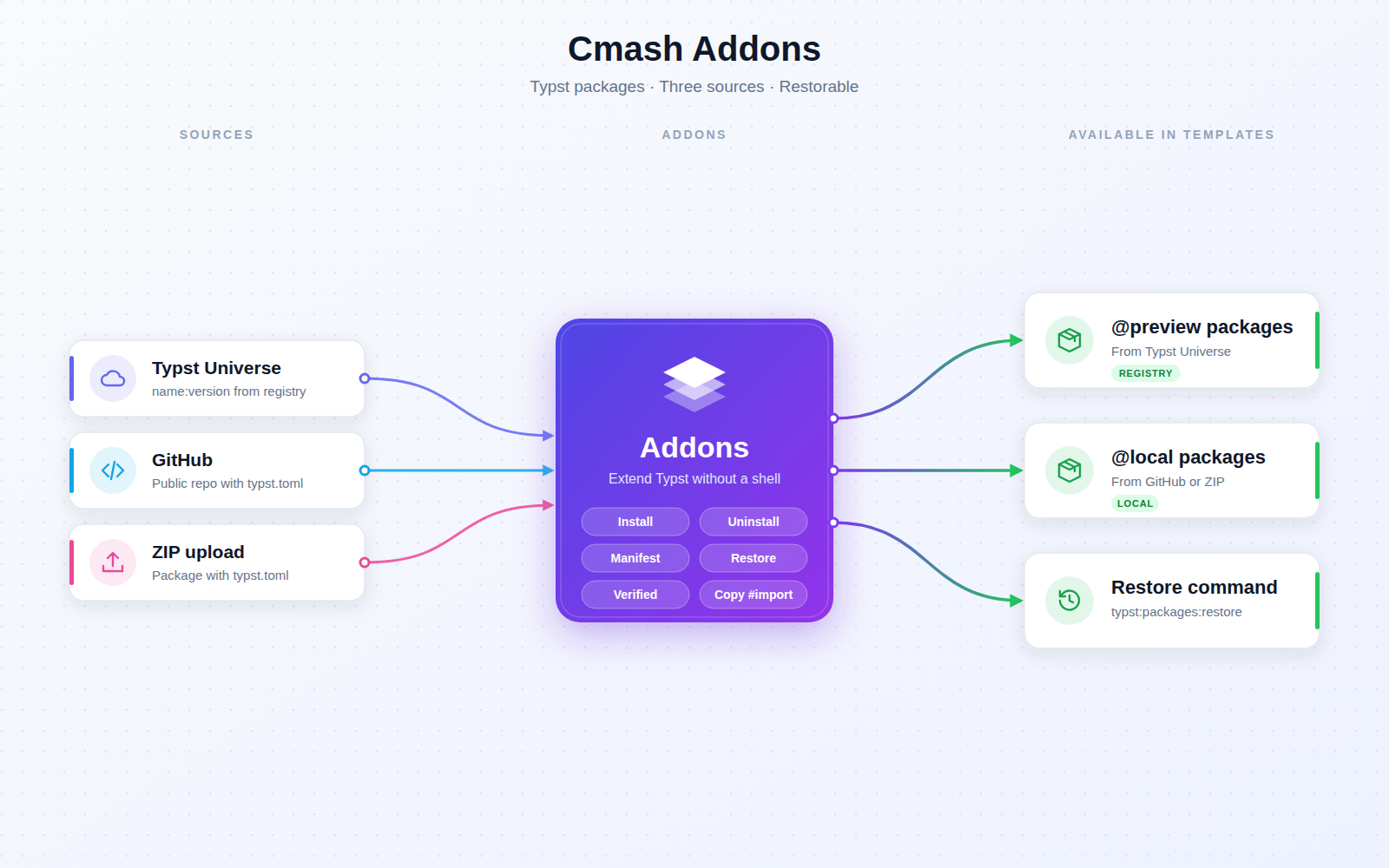
Typst templates can use community packages (fonts, layouts, charts, QR codes …). CMAsh Addons adds a Typst Addons page (navigation group Typst) where administrators install, list and remove these packages. Installed packages can be imported in templates immediately.
Key Features
Install Packages
- Typst Universe — enter
name:version,preview/name:versionor@preview/name:version; the package is downloaded from the official registry and verified (typst.tomlmust exist). - GitHub — give a public repository URL (a
tree/branchURL is supported); the repository must contain atypst.toml. Installed as@local/name:version. - ZIP upload — upload a ZIP with a Typst package (must contain
typst.toml). Installed as@local/name:version.
Manage Installed Packages
- Overview — name, version, source (Universe/Local), description and the ready-to-copy
#importline. - Uninstall — with confirmation.
- Clear feedback — success and error notifications on every action.
Manifest and Restore
- Manifest — every installation is recorded in a manifest.
- Restore — after a redeployment or a fresh server, Restore from Manifest (or the command
typst:packages:restore) re-downloads missing packages. - Caveat — ZIP-uploaded packages cannot be restored automatically and must be uploaded again.
Integrations & API
No REST API. One console command:
| Command | Purpose |
|---|---|
typst:packages:restore [--force] |
Restore packages from the manifest (--force is declared to reinstall existing ones). |
Permissions & Dependencies
- Permission — the page is visible only to users with
View:ManageAddons(assign via roles). - Requires
enobis/cmash, Filament 5, PHP 8.3 and thezipPHP extension. - Server needs the
tarcommand, and internet access topackages.typst.org(or your mirror) and GitHub for those sources. - The Typst compiler package reads the storage paths below, so packages resolve as
@preview/...and@local/.... - Media backups of
cmashincludestorage/app/typst-packages.
Configuration
Config file config/cmash-addons.php:
| Key | Env variable | Default | Meaning |
|---|---|---|---|
packages_path |
TYPST_PACKAGES_PATH |
null → storage/app/typst-packages/preview |
Directory for Universe (@preview) packages. |
local_packages_path |
TYPST_LOCAL_PACKAGES_PATH |
null → storage/app/typst-packages/local |
Directory for GitHub/ZIP (@local) packages. |
registry_url |
TYPST_REGISTRY_URL |
https://packages.typst.org/preview |
Base URL for downloads: {registry_url}/{name}-{version}.tar.gz. |
The manifest is stored at storage/app/typst-packages/packages-manifest.json. Keep the typst-packages directory on a persistent volume in container deployments.
Use Cases
- Self-service packages — admins add a chart or QR-code package without server access.
- Private packages — install an internal package from a GitHub repo or ZIP.
- Reproducible deployments — restore all packages from the manifest on a fresh server.
- Template authoring — copy the ready-made
#importline straight into a template.
Cmash Addons: Typst packages, one click away.