
Document Package
Cmash Document
The blueprint for every personalized output. A Cmash Document combines layout, input, brand identity and data into one reusable definition. Your team configures it once, and anyone can use it to produce on-brand results.
Overview
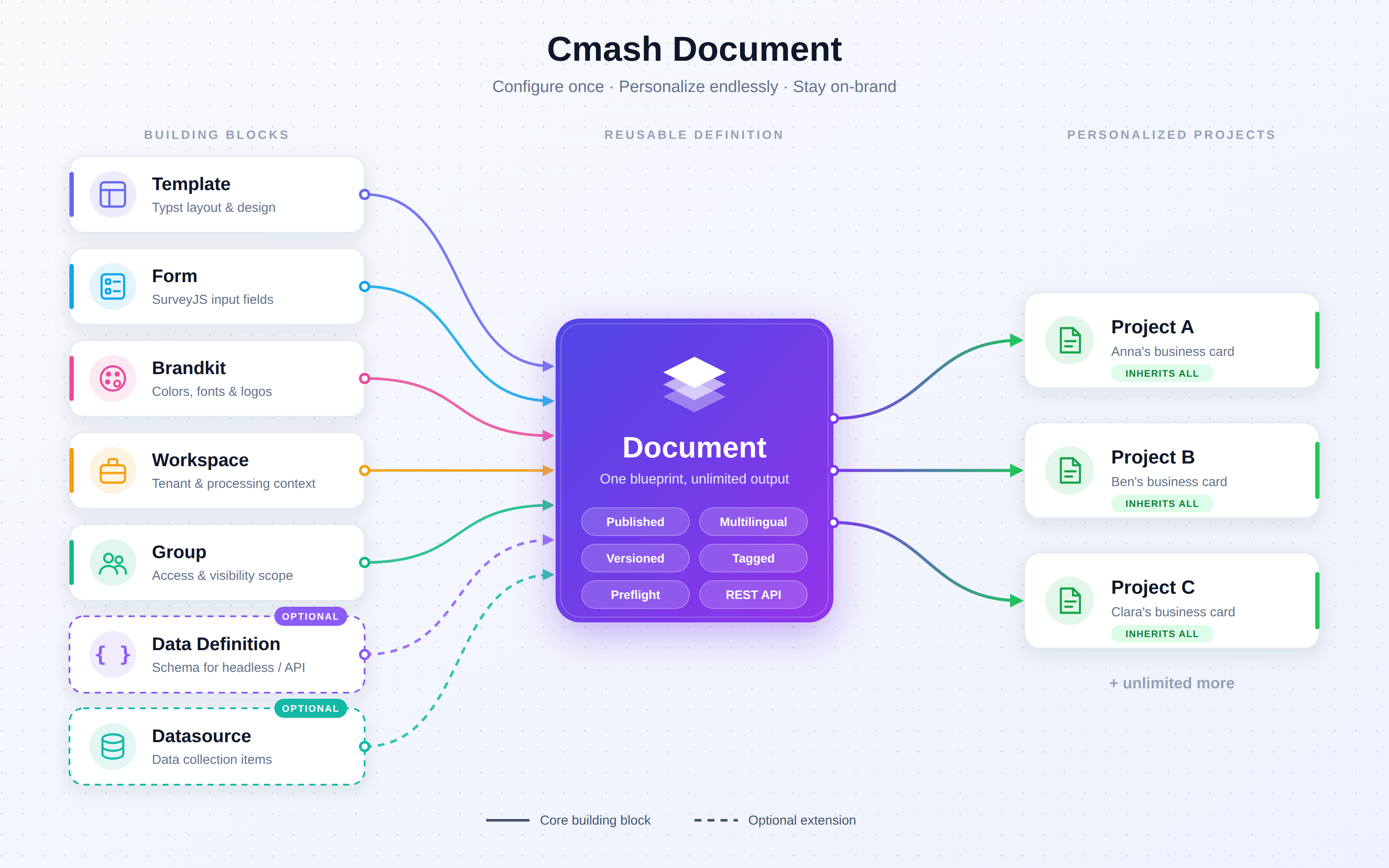
In Cmash, a Document is a ready-to-use product definition. It bundles everything needed to produce a personalized piece of output:
| Building Block | Purpose |
|---|---|
| Template | The Typst layout that defines the design and structure |
| Form | The SurveyJS input mask that defines what users can fill in |
| Brandkit | Brand colors, fonts and logos applied automatically |
| Workspace | Where the document belongs and how its output is processed |
| Group | Organizational scope that controls who can see and use it |
| Data Definition | An optional data schema for headless and API scenarios |
| Data Collection | An optional datasource for producing many items in one go |
Once a document is defined, every Project created from it starts pre-configured: the right layout, the right fields, the right brand. Nothing has to be set up again.
Why Cmash Document?
- Configure once, use many times. One document definition can produce any number of personalized projects.
- Brand consistency by design. Brand assets are part of the document, so users can't go off-brand.
- Clear separation of roles. Designers own templates, content managers own forms, brand managers own brandkits. The document brings their work together.
- Built for scale. Multilingual support, group-based access, data collections and a REST API make it suitable for large organizations and automated workflows.
- Safe to change. Every change is versioned and can be reviewed or restored at any time.
Features
Document Composition
Build a complete document from modular, reusable parts.
- Template binding: pick the Typst template that defines the visual layout. Supported languages appear next to each template name, so you can choose the right one quickly.
- Form binding: attach a SurveyJS form that controls which fields end users can edit.
- Brandkit binding: assign a brandkit so brand colors, fonts and logos are applied automatically.
- Workspace binding: link the document to a workspace for tenant separation and processing context.
- Data Definition override: optionally attach a data definition (schema) that overrides the template's own schema. This is useful when a document is filled headlessly through the API.
- Quick navigation: every linked component has an "open" shortcut that opens its configuration in a new tab, so you can jump from a document to its template, form, brandkit, workspace, group, datasource or data definition.
Publishing Lifecycle
Decide when a document is ready for users.
- Unpublished / Published states with clear color-coded badges and icons.
- New documents start as Unpublished by default. You can prepare and test in private, then publish when ready.
- The state is visible everywhere: in the table view, the grid view, and the change history.
Multilingual Support
Designed for international brands and multi-market rollouts.
- Language assignment: specify which languages a document supports. Leave it empty to make the document available in all languages.
- Language-aware selectors: templates, forms, brandkits and groups show their supported languages, which helps you combine matching components.
- Translatable collection texts: data collection titles and descriptions can be translated per language. The available languages follow the configuration of the document's group, including its default language.
Visual Catalog
Present your documents the way your users think about them: visually.
- Preview images: upload a thumbnail or mockup for each document.
- Grid view: browse documents as image cards showing the state, name, workspace, brandkit and description.
- Table view: a detailed list with sortable, searchable and toggleable columns.
- One-click layout switch: toggle between grid and table view. Your choice is remembered for the session.
- Card actions: edit, create a project, or delete directly from each card.
One-Click Project Creation
Turn a document into a working project instantly.
- "Create Project" action is available in the table, the grid and the edit page.
- Everything is inherited automatically: template, form, brandkit, workspace, group, preflight setting and tags are copied to the new project.
- Traceable origin: every project keeps a reference to the document it was created from.
- Straight to the editor: the new project opens directly in the preview editor, ready to personalize.
Template Editor Shortcut
Refine the design in the context of real data.
- Open the template editor from a document: CMAsh creates a working project and opens the template editor with the document's data and data chooser.
- Two modes:
- Create & Open: edit the template in the standard context.
- Create & Open with Admin Form: edit with the administrative form for extended control.
- Seamless return: a back link takes you straight back to the document. Your light/dark theme preference carries over.
Editor Experience Settings
Adjust the end-user editing experience for each document.
- Preflight Check: optionally show a "Preflight Check" button in the editor. It validates all required form fields before submission, so fewer incomplete jobs get through.
- Initial Zoom Level: set the zoom level of the editor preview when it opens, either as a percentage (e.g. 67, 100, 150) or
autoto fit the page on screen.
Data Collections
Produce many personalized items from one document, such as product labels, name badges or price tags, all driven by your data.
- Datasource-driven: connect the document to an active datasource intended for data collections.
- Document-level override: collection settings on the document take priority over the linked form's settings. A clear notice appears when the form already has its own configuration.
- Dynamic item labels: define how collection entries are labeled with expressions such as
{product_name}. - Row limits: set a minimum and maximum number of items (0 = no limit).
- Detailed user permissions. You decide what end users can do:
- Show or hide the collection navigator panel
- Import items from CSV files
- Add new items manually
- Delete items
- Reload data from the datasource
- View all items at once in a grid overview
- Custom title and description: guide users with translatable collection headings.
Organization & Discovery
Keep large document libraries manageable.
- Tags: categorize documents (e.g. "Business Cards", "Packaging", "Internal") and filter by tag.
- Tag inheritance: projects inherit all tags from their document automatically.
- Groups: assign documents to organizational groups. Users only see documents from the groups they have access to, and new documents default to the currently selected group.
- Global search: find documents by name from anywhere in the admin panel, with creation and update dates shown in the results.
- Search & sort: search by name, description or UUID, and sort by name, state, languages, assignee, status and dates.
Assignment & Workflow Status
Coordinate document setup across your team.
- Assigned To: make a team member responsible for configuring or reviewing a document.
- Workflow status: track progress with configurable statuses (e.g. Open, In Progress, Finished), each with its own color and icon.
- Default status: new documents automatically receive the status marked as the system default.
- At-a-glance badges: the assignee and status are displayed as badges in the document list.
Version History & Audit Trail
Change documents without worrying about mistakes.
- Automatic snapshots: every change to a document's configuration is stored as a full version snapshot.
- History view: review past revisions, compare them, and restore earlier states from the "History" page.
- Creator tracking: see who created a document, including whether it was created through the API.
- Origin tracking: documents are labeled Internal (created in the admin panel) or External (created through an API token).
- Entity origin protection: documents synced from other sources can be marked and protected against accidental editing.
Duplicate & Reuse
- Duplicate action: copy an existing document as the starting point for a new one. The copy gets "(Copy)" added to its name, a fresh identity, and opens immediately for editing.
- Stable identifiers: every document has a unique UUID that can be copied from the list, which makes it easy to use in integrations.
REST API
Connect CMAsh Document to your web shops, PIM, ERP or custom applications.
- Secure access with Laravel Sanctum token authentication.
- Full CRUD: list, create, read, update and delete documents programmatically.
- Image upload: upload preview images through the API. Old images are cleaned up automatically on replacement or deletion.
- Advanced filtering:
search: partial name matchworkspace_id: restrict to a workspacetags: comma-separated tag slugs or UUIDstag_match:any(at least one tag) orall(every tag)per_page: control pagination
- Rich responses: the API returns the UUID, name, description, image URL, languages, linked component IDs and full tag details (name, slug, color, type).
| Method | Endpoint | Description |
|---|---|---|
GET |
/api/documents |
List and filter documents |
POST |
/api/documents |
Create a document |
GET |
/api/documents/{id} |
Retrieve a single document |
PUT |
/api/documents/{id} |
Update a document |
DELETE |
/api/documents/{id} |
Delete a document |
Use Cases
| Scenario | Composition |
|---|---|
| Business cards | Corporate card template + employee details form + corporate brandkit |
| Price labels | Label template + product form + retail brandkit + product datasource collection |
| Packaging variants | Front label, back label and hang tag documents, each sharing one brandkit |
| Multilingual flyers | One flyer template + translated forms, limited to the languages of the target market |
| Event badges | Badge template + attendee datasource with CSV import, printed in one batch |
| Web-to-print shop | Published documents offered in an online shop, filtered by tag through the REST API |
| Headless automation | A document with a data definition, filled and rendered automatically by an external system |
Integrates With
CMAsh Document is the central hub of the CMAsh platform and works with these components:
- CMAsh Template: Typst-based layouts
- CMAsh Form / SurveyJS: dynamic input forms
- CMAsh Brandkit: brand assets and identity
- CMAsh Workspace: tenants and processing context
- CMAsh Group: organizational access control
- CMAsh Datasource: data collections
- CMAsh Data Definition: data schemas
- CMAsh Tag: categorization
- CMAsh Project: personalized instances created from documents
- CMAsh Editor: preview and template editing
CMAsh Document: configure once, personalize endlessly, stay on-brand.