Renderer Package
Cmash Renderer — Feature Overview
Define how finished documents are produced — PDF, PNG or SVG, from screen to professional print.
What Is Cmash Renderer?
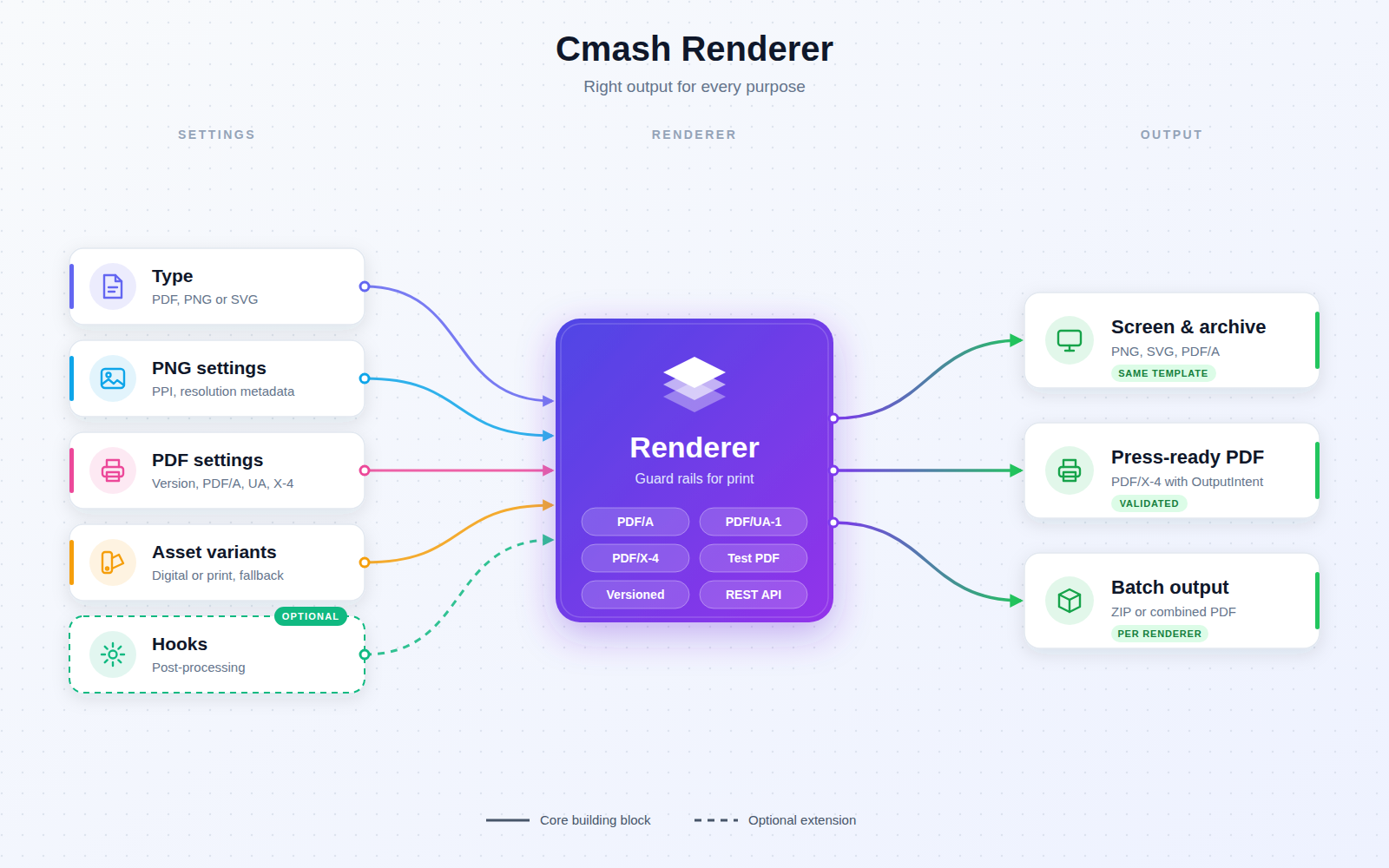
A renderer is a reusable output profile: it says which format to generate and with which quality settings. Renderers are attached to workspaces, so users and integrations can choose e.g. "Web PDF", "Print PDF/X-4" or "Preview PNG" when downloading a document. The right output for every purpose — screen, archive, accessible or press-ready — comes from the same template, and misconfigured print setups are rejected at save time, not on the day of printing.
Key Features
Renderer Management (Configuration → Renderer)
- Core fields — name, slug, type (PDF, PNG, SVG), active flag, tags. The list shows type badge, status, tags, creator, origin and timestamps, with a tag filter.
- History, Duplicate and Used by — version history, one-click duplication, and an overview of the linked Workspaces.
- Reusable — one renderer serves many workspaces.
PNG Settings
- PPI — default 144.
- Resolution metadata — optionally embed pHYs so image editors show the right physical size.
PDF Settings
- PDF version — 1.4 – 2.0 (Auto by default).
- PDF standards — filtered by version: PDF/A-1a/1b, 2a/2b/2u, 3a/3b/3u, 4/4f/4e, PDF/UA-1 (accessibility) and PDF/X-4 (professional print, requires PDF 1.6).
- Disable PDF tags — off by default; forced on for PDF/UA-1.
- PDF/X-4 — printing condition (OutputIntent) taken from the chosen asset variant's colour profile, optional override profile, and a failure policy: fail the job (default) or warn and keep findings. PDF/X cannot be combined with PDF/A or PDF/UA.
- Output capabilities report — shows what the server can produce.
- Test PDF Settings — compiles a tiny sample to check the setup.
Asset Variants
- Variant choice — pick which prepared colour variant of shared assets a renderer uses (Print or Digital); the effective colour profile is displayed.
- Fallback order — optional, overrides the global one: specific type, default Digital, default Print, or original file. An empty list means "no substitution — fail instead". Invalid types are refused on save.
Batch Output (PDF)
- For data collections — ZIP of individual PDFs (default) or one combined PDF (needs a configured executable
qpdf; otherwise disabled).
Post-Processing Hooks
- Hook overview — the edit page lists active hooks targeting renderers (name, type e.g. Typst Imposition / Webhook, event, scope, sync/async) with links to edit them.
Integrations & API
REST API, secured with a Sanctum token:
| Method | Path | Purpose |
|---|---|---|
GET |
/api/renderers |
List (active, search, per_page) |
POST |
/api/renderers |
Create (name, type required) |
GET |
/api/renderers/{renderer} |
Show |
PUT |
/api/renderers/{renderer} |
Update |
DELETE |
/api/renderers/{renderer} |
Delete |
Permissions & Dependencies
- Requires PHP 8.3+, Filament 5, Sanctum,
enobis/cmash>= 1.1.0. - The admin UI and validation additionally use
cmash-typst(compiler, PDF/X finishing, batch output),cmash-asset(variant types and fallback),cmash-tag,cmash-workspace(usage) and optionallycmash-hook. - No package-specific roles or permissions; standard panel resource authorization applies. The API needs a Sanctum token. Entities of external origin can be locked against editing.
Configuration
No config file and no package-specific environment variables. Related external settings: QPDF_BINARY (enables combined PDF output) and cmash-typst.binary (Typst executable) belong to the CMAsh Typst / core packages. Renderer options are stored per renderer (config JSON):
| Key | Default | Meaning |
|---|---|---|
ppi |
144 | PNG resolution |
embed_resolution_metadata |
off | Write PPI into PNG metadata |
pdf_version |
auto | Minimum PDF version |
pdf_standards |
none | PDF/A, PDF/UA, PDF/X-4 selection |
no_pdf_tags |
off | Remove accessibility tags |
pdfx_failure_policy |
fail |
fail or warn on PDF/X preflight problems |
| PDF/X OutputIntent override | empty | Alternative compatible print profile |
asset_variant_type_id |
global default | Asset variant type |
variant_fallback_chain |
global | Renderer-specific fallback order |
batch_output_format |
ZIP | ZIP or combined PDF |
Use Cases
- Web delivery — a lightweight "Web PDF" renderer for downloads and email attachments.
- Press-ready print — a PDF/X-4 renderer with the right printing condition, checked on save.
- Accessible documents — PDF/UA-1 output for compliance requirements.
- Previews — PNG or SVG renderers for quick visual proofs.
- Mass mailings — batch output as ZIP of individual PDFs or one combined PDF.
Cmash Renderer: the right output, every time.