SurveyJs
Cmash SurveyJS — Feature Overview
Edit your forms as JSON and see them live. With a full picture of where each form is used.
What Is Cmash SurveyJS?
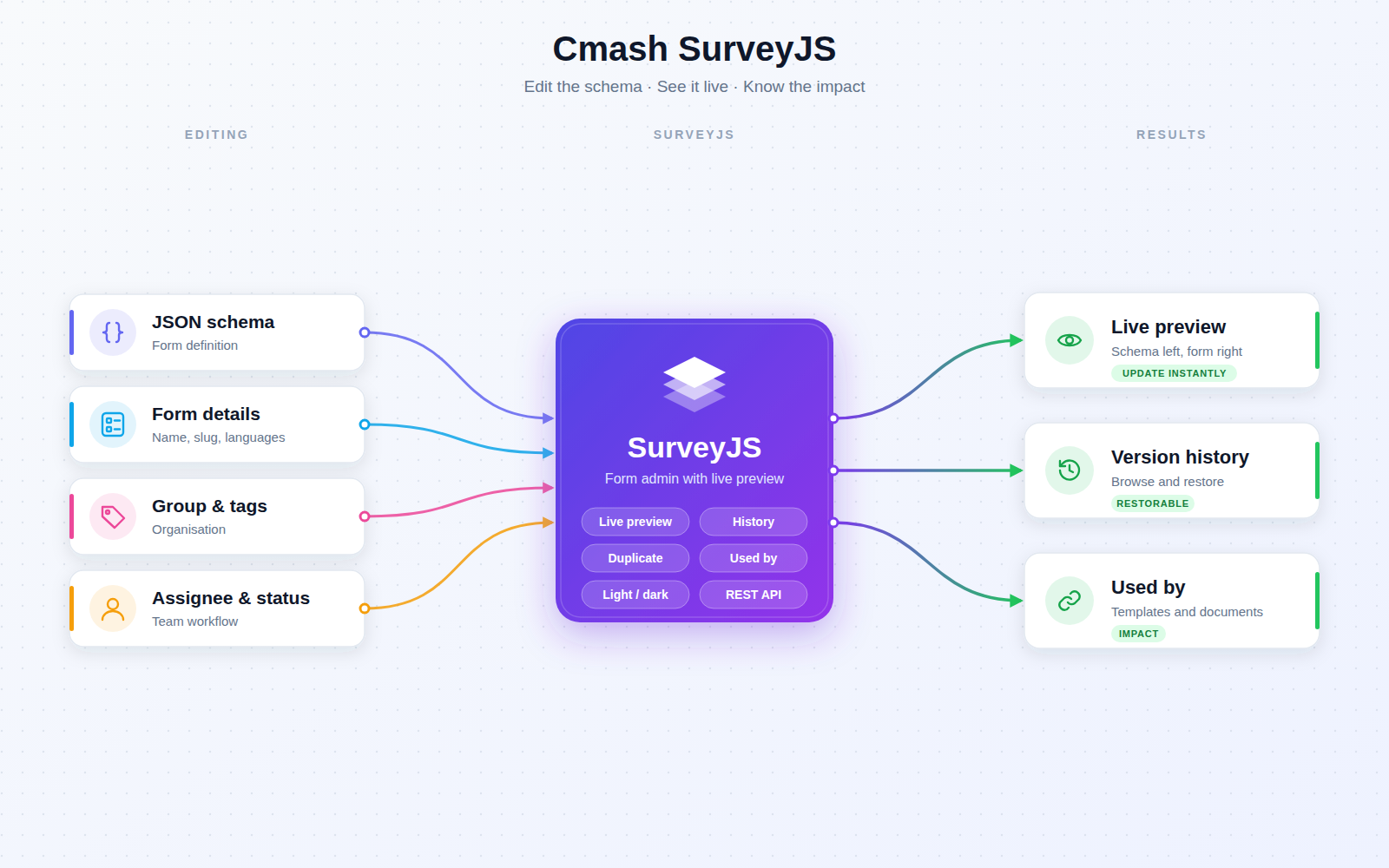
Cmash SurveyJS is the form-management interface of CMAsh. It builds on cmash-form and adds the admin screens for editing SurveyJS form schemas with a code editor, a live preview, version history, tags, status and "used by" overviews. You see the form as end users will see it, change it safely, and know its impact before you do.
Key Features
Form Management (Configuration → Forms)
- List — search, sort, tag filter, language badges, active state, group, assignee, status, creator and origin (Internal / External).
- Create/edit — name, slug, tags, description, languages (as configured in the general settings), group (with shortcut to the group), active toggle, assignee, status (default status pre-selected) and the Schema (JSON) in a code editor with JSON highlighting.
- History — browse and restore earlier versions.
- Duplicate — automatic "(Copy)" name and new slug.
- Read-only external entities — entities of external origin can be marked read-only via the CMAsh core origin mechanism.
- Group-based visibility filtering.
Know the Impact
- Used by — a section and list indicator showing linked Templates and Documents (with group), plus relation tabs to open them.
Live Preview Page
- Split view — opens from the list or edit page (Preview) full-screen: schema editor on one side, rendered SurveyJS form on the other, with a draggable divider.
- Update Preview — re-renders instantly (invalid JSON is ignored until fixed).
- Save stores the schema; Back returns to the edit page.
- Theme — light/dark switch when dark mode is enabled.
Integrations & API
Token-secured (Laravel Sanctum):
| Method | Endpoint | Description |
|---|---|---|
GET |
/api/forms |
List (active, search, per_page) |
POST |
/api/forms |
Create (name required; slug generated if omitted) |
GET |
/api/forms/{form} |
Show |
PUT |
/api/forms/{form} |
Update |
DELETE |
/api/forms/{form} |
Delete |
Requests accept an optional language value for localized output.
Permissions & Dependencies
- Permissions — none of its own. Access follows the panel's resource authorization and group scope. The preview page is open to any panel user who can reach it (
canAccessreturns true), so restrict panel access accordingly. API needs a Sanctum token. - Requires PHP 8.3+, Filament 5, Laravel Sanctum, and CMAsh packages
enobis/cmash,cmash-form(data model),cmash-code-editor(JSON editor) andcmash-tag(tags) — all >= 1.1.0. - Also links to
cmash-templateandcmash-documentfor the "used by" lists; groups come from the CMAsh group functionality.
Configuration
This package has no config file and no environment variables. It only registers routes, migrations and views.
| Item | Value | Meaning |
|---|---|---|
| Config keys | none | – |
| Environment variables | none | – |
| Language options | available_locales (CMAsh general settings) |
Languages offered on forms |
| Navigation | Configuration → Forms | Where the form manager appears |
Use Cases
- Build and tune forms — edit the JSON schema and check the result side by side.
- Impact checks — see which templates and documents use a form before changing it.
- Rollback — restore an earlier version after a bad edit.
- Large form libraries — organise with tags, groups, assignees and statuses.
- Integrations — manage localized forms through the API.
Cmash SurveyJS: see your forms before you ship them.