Brandkit Package
Cmash Brandkit — Feature Overview
Define your brand once (colours, fonts, logos, wording) and have every template and document use it.
What Is Cmash Brandkit?
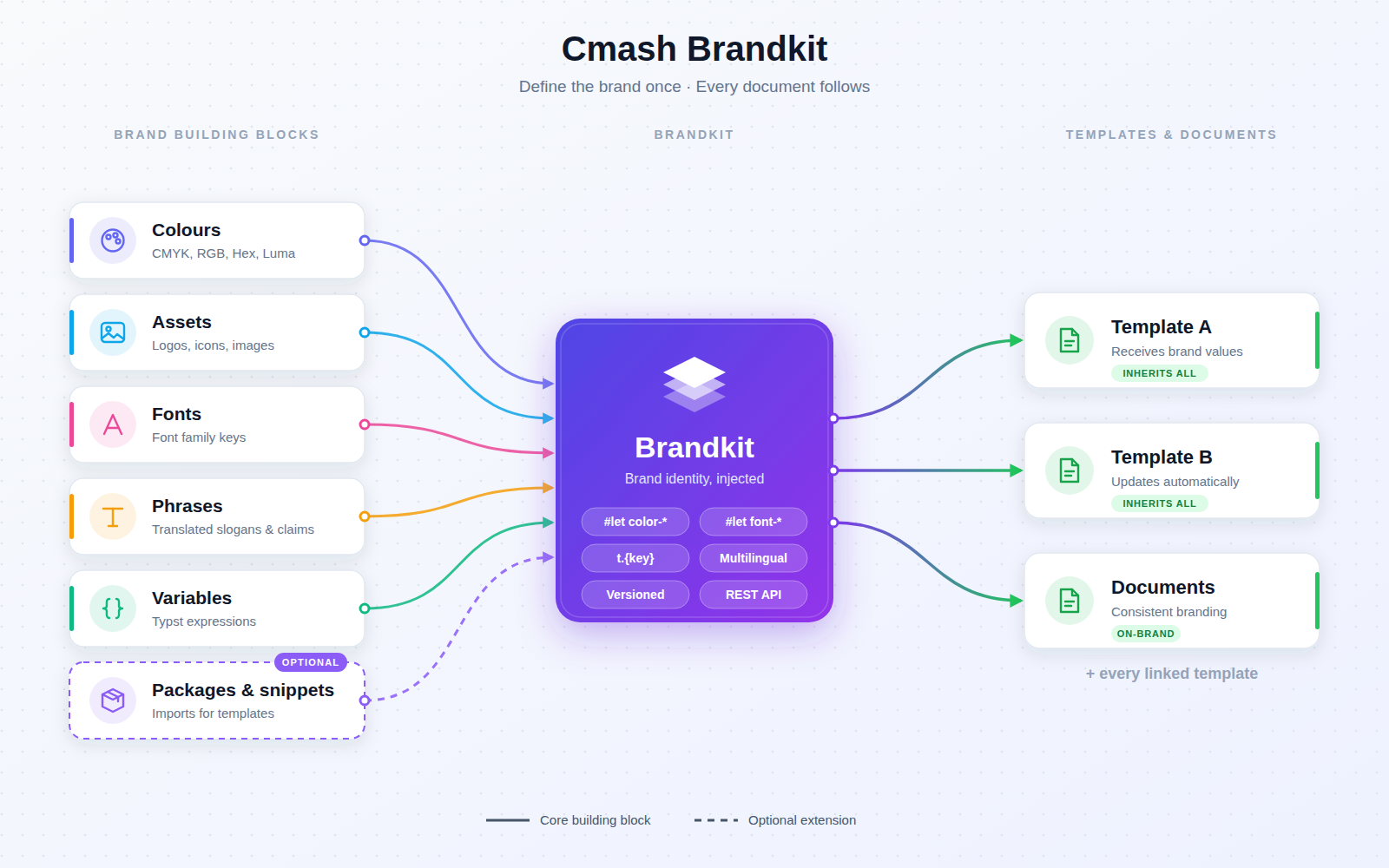
A brandkit bundles the building blocks of a brand's look and voice. Templates that use a brandkit receive these values automatically, so a change in the brandkit updates all linked templates and documents. Marketing teams maintain it through a simple form, with no template editing.
Key Features
General
- Basics — name, URL identifier (slug), description, logo, active switch.
- Group assignment — optional, to scope the brandkit to a brand or team, with a shortcut to open the group. New brandkits default to the currently selected group.
- Languages — the languages the brandkit supports (empty = inherits from the brand or all languages).
- Multiple brandkits per brand — for example light, dark, print; change history for every edit.
- "Used by" overview — see which templates and documents use a brandkit.
Brand Colours
- Named colours edited with a visual colour picker supporting CMYK, RGB, Hex and Luma.
- Template access — available as
#let color-{name}. - Convenient — reorder, and copy the variable name with one click.
Brand Assets
- Library assets under your own keys — logos, icons and images chosen with an asset browser and preview.
- Template access —
#let asset-{key} = "assets/{slug}.{ext}"; templates inherit these assets.
Brand Fonts
- Font mapping — map a key to a font family, with a browser of the installed fonts.
- Template access —
#let font-{name} = "Font Family".
Phrases and Translations
- Recurring text — slogans, legal lines and claims with a translation per language.
- Template access — read via
t.{key}; edit once, every document follows.
Variables
- Custom named values as Typst expressions, available in every template using the brandkit, with a built-in help hint.
Packages and Snippets
- Automatic imports — choose installed Typst packages and snippets to import in every template of the brandkit.
- Import modes — module, all, or specific functions; a parser button detects a package's or snippet's exports so you can pick them.
- Reference — the always-imported CMAsh snippets are shown.
Integrations & API
Token-secured (Laravel Sanctum):
| Method | Endpoint | Description |
|---|---|---|
GET |
/api/brandkits |
List (filters: active, search, group_id; paginated, default 15). |
POST |
/api/brandkits |
Create. |
GET |
/api/brandkits/{brandkit} |
Retrieve. |
PUT |
/api/brandkits/{brandkit} |
Update. |
DELETE |
/api/brandkits/{brandkit} |
Delete. |
The API validates name, slug, description, colours, fonts, logo, group and active state; phrases, variables, assets and imports are edited in the admin panel.
Integrates with the Template, Document, Typst and Asset modules (linked templates/documents, package and snippet imports, asset picker).
Permissions & Dependencies
- Requires CMAsh core (
enobis/cmash), CMAsh Group (enobis/cmash-group), Filament 5, Laravel Sanctum, PHP 8.3+. - No roles of its own; standard resource permissions apply.
- Group restrictions of the user limit which groups can be selected.
Configuration
No config file, no environment variables, no settings page.
| Item | Value |
|---|---|
| Config keys / env vars | none |
| Navigation | Configuration → Brandkit (sort 20) |
| Database table | cmash_brandkits |
| Logo storage | public disk, directory brandkits/logos |
Use Cases
- Consistent brand identity — one source for colours, fonts, logos and claims across all documents.
- Multi-variant brands — light, dark and print brandkits for one brand.
- Marketing self-service — update slogans or legal lines without touching templates.
- Multi-language wording — translated phrases maintained centrally.
Cmash Brandkit: your brand, applied consistently.