Embed Package
Cmash Embed — Feature Overview
Put the CMAsh editor inside your own website or shop. No CMAsh login required for your customers.
What Is Cmash Embed?
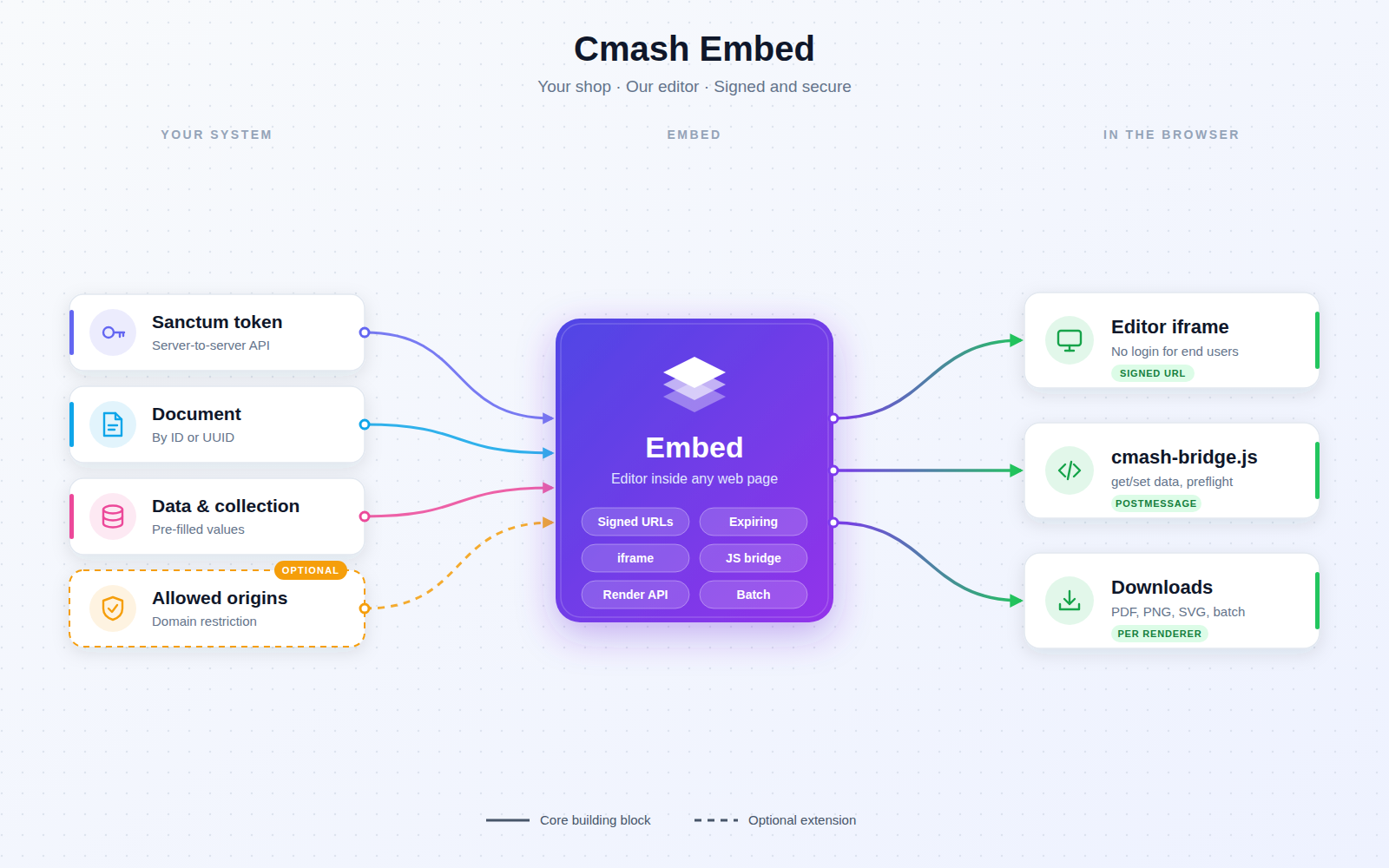
CMAsh Embed lets an external system (a web shop, a CMS, a customer portal) create a project from a CMAsh document, open the full CMAsh editor inside an <iframe>, and fetch the finished PDF/PNG/SVG afterwards. End users edit through a secure, time-limited link; your backend talks to CMAsh through a token-protected API.
Key Features
Signed Editor Links
- No accounts for end users — customers open a signed link and start editing right away.
- Secure by default — the editor is reached via a signed URL (
/embed/editor/{project}); tampered or expired links are rejected with "Invalid or expired editor link." - Configurable lifetime — default 24 hours; a fresh link can be requested at any time.
- Theme and toolbar — optional
theme_mode(light/dark) andcustom_toolbar_widthcan be appended to a link without invalidating the signature.
Create and Manage Projects via API (Sanctum token)
- Create — a project from a document (by ID or UUID); it inherits the document's template, form, workspace, brand kit, group, preflight setting and tags. Pass a name, pre-filled
data, adata_collection(multiple items, e.g. many badges/letters), server-sideprivate_data, an externalreferenceand atheme_mode. The response contains the project and a ready-to-useeditor_url. - Read — a project by UUID (including a fresh editor URL).
- Update — name, data, data collection, private data and reference.
- Brand/group protection — API users may only create projects for documents in groups they can access.
Rendering and Downloads
- Quick render — PDF, PNG or SVG of a project's saved data.
- Download options — lists the active renderers of the project's workspace with ready-made download URLs (and batch URLs if the project has more than one collection item).
- Download with a renderer — compiles with the chosen renderer's settings and streams the file.
- Batch download — for data collections (two or more items): asynchronous (returns a batch ID, poll status, then download the ZIP / combined PDF) or synchronous with
?sync=truefor small collections. Output type (ZIP or combined PDF) follows the renderer configuration. - Diagnostics — render diagnostics are returned as response headers.
iframe Embedding
- Stays in your look and feel — the editor lives in your page; light/dark theme and toolbar width can be set per link.
- Framing allowed for your domains — Content-Security-Policy
frame-ancestors; CMAsh's default framing block is removed for these pages only. - Full editor — form, live preview, zoom, undo/redo, image upload, download.
JavaScript Bridge (cmash-bridge.js)
A tiny script for the parent page (publishable to public/vendor/cmash-embed) that talks to the editor via postMessage. Your system stays in control: read and set form values, validate before "Add to cart", and load or import data collections.
| Method | Purpose |
|---|---|
connect() |
Wait until the editor reports ready |
preflightCheck() |
Validate the form before continuing (e.g. add to cart) |
getVariables() / setVariables(data) |
Read / write form values |
setZoom(level) |
Control preview zoom |
getDataCollection() / setDataCollection(items) |
Read / replace collection items |
importCsvData(rows, mode) |
Import rows into the collection (default mode append) |
destroy() |
Remove listeners |
Integrations & API
All API calls require a Sanctum bearer token and are prefixed with /api/embed.
| Method | Endpoint | Description |
|---|---|---|
POST |
/projects |
Create project, get editor URL |
GET |
/projects/{uuid} |
Show project |
PUT |
/projects/{uuid} |
Update project data |
GET |
/projects/{uuid}/editor-url |
New signed editor URL + validity in minutes |
POST |
/projects/{uuid}/render |
Render (output_format: pdf/png/svg) |
GET |
/projects/{uuid}/download-options |
Renderers and download URLs |
POST |
/projects/{uuid}/download/{rendererUuid} |
Compile with renderer and download |
POST |
/projects/{uuid}/download-batch/{rendererUuid} |
Batch compile (async, or ?sync=true) |
GET |
/batches/{batchUuid}/status |
Batch progress |
GET |
/batches/{batchUuid}/download |
Download finished batch (409 while running) |
Permissions & Dependencies
- Permissions — the package defines no roles or permissions of its own. API access is via Sanctum tokens, restricted by the group access rules of the token's user; editor access is granted by the signed link only.
- Requires PHP 8.3+,
ext-zip, Laravel 13, Livewire 4, Laravel Sanctum, and the CMAsh packagesenobis/cmash,cmash-document,cmash-editor,cmash-project,cmash-typst(all >= 1.1.0). - Also uses groups, renderers/workspaces and datasources from the wider CMAsh suite where present. It adds no Filament admin pages.
Configuration
Publish with php artisan vendor:publish --tag=cmash-embed-config (config file config/cmash-embed.php); assets with --tag=cmash-embed-assets.
| Key | Env variable | Default | Meaning |
|---|---|---|---|
url_lifetime |
CMASH_EMBED_URL_LIFETIME |
1440 |
Validity of signed editor URLs in minutes (24 h) |
allowed_origins |
CMASH_EMBED_ALLOWED_ORIGINS |
* |
Comma-separated origins allowed to frame the editor, e.g. https://shop.example.com,https://admin.example.com. * allows everyone. When specific origins are set, 'self' is added automatically |
route_prefix |
CMASH_EMBED_ROUTE_PREFIX |
embed |
URL prefix of the embeddable editor routes |
Tip: for production, replace
*with your own domains.
Use Cases
- Web-to-print shop — customers personalise a product in an iframe, then your shop fetches the print-ready PDF.
- Customer portals — offer branded self-service editing without creating CMAsh accounts.
- Validate before checkout — run the preflight check via the bridge before "Add to cart".
- Bulk personalisation — send many items as a data collection and download one batch (badges, letters).
- Pre-filled projects — create projects from your system's data with a private reference.
Cmash Embed: the CMAsh editor, inside your website.