Project Package
Cmash Project — Feature Overview
Turn a document into a personal, ready-to-download result. And keep track of every rendering.
What Is Cmash Project?
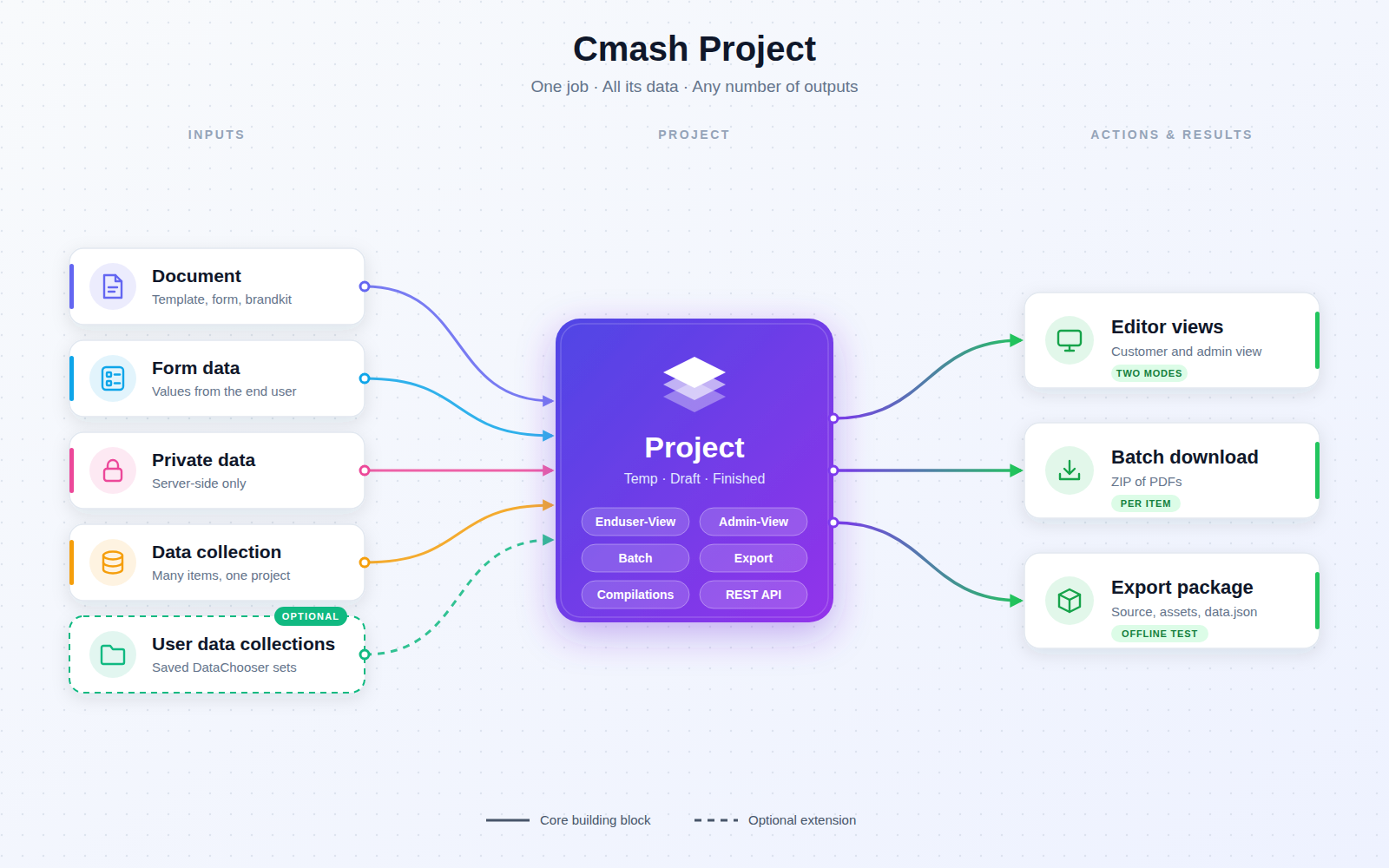
A project is one person's (or system's) filled-in instance of a document: it joins a template, a form, a brand kit and a workspace with the entered data. Projects can be edited in the Cmash editor, rendered to PDF/PNG/SVG, and can hold whole data collections for batch production (e.g. 200 name badges).
Key Features
Project Management (Projects → Projects)
- Everything in one place — name, description, state, tags, data (key/value), private data, template, form, workspace, brand kit, group and reference; links open the related items.
- States — Temp (default), Draft, Finished; filterable and shown as coloured badges.
- Private data — server-side only and never sent to the browser editor (for integrations such as ident values).
- Data collection — editable as JSON; one project, many items, one batch download.
- List — search, tag and state filters, collection size badge, creator/origin (Internal/External), toggleable reference/template/form etc.
- Group-based visibility.
- Safe clean-up — deleting a project also removes its rendered files.
Actions on a Project
- Enduser-View — opens the editor as customers see it.
- Admin-View — opens it with admin mode.
- Template Editor — open the template with this project's data; optionally create a project and open with the admin form.
- Download Batch — compile all collection items and download a ZIP of PDFs.
- Export Package — download a
.tar.gzwith source, snippets, assets, fonts, user assets anddata.json, for offline testing (choose a collection item or base data). - Duplicate (tags copied) and Delete.
- Compilations section — traceable: tabs for single and batch compilations with counts and "view all" links (if the user may view them).
User Data Collections (Content → User Data Collections)
- Saved data sets — name, notes, JSON data, item count; linked to a project and optionally a datasource, with view/edit/delete and creator info.
Integrations & API
Token-secured (Laravel Sanctum):
| Method | Endpoint | Description |
|---|---|---|
GET |
/api/projects |
List (search, per_page) |
POST |
/api/projects |
Create |
GET |
/api/projects/{project} |
Show |
PUT |
/api/projects/{project} |
Update |
DELETE |
/api/projects/{project} |
Delete |
POST |
/api/projects/{project}/render |
Render as PDF (default), PNG or SVG |
Render errors return diagnostics; success headers carry render diagnostics. The embed package (cmash-embed) builds on projects.
Permissions & Dependencies
- Permissions —
UserDataCollectionuses Filament-Shield style permissions checked via policy:ViewAny,View,Create,Update,Delete,DeleteAny,Restore,RestoreAny,ForceDelete,ForceDeleteAny,Replicate,Reorder(each suffixed:UserDataCollection). Projects themselves rely on panel authorization and group scope; the compilations section is only shown to users allowed to view compilations/batches. The preview pages are accessible to any panel user. - Requires PHP 8.3+,
ext-zip, Filament 5, Sanctum, and CMAsh packagescmash,cmash-editor,cmash-template,cmash-form,cmash-workspace,cmash-brandkit,cmash-typst,cmash-userasset,cmash-code-editor(all >= 1.1.0). - Also uses groups, tags, documents and datasources from the suite.
Configuration
This package has no config file and no environment variables.
| Item | Value | Meaning |
|---|---|---|
| Config keys | none | – |
| Environment variables | none | – |
| Template editor route prefix | cmash-editor.route_prefix (default cmash) |
Read from the editor package |
Use Cases
- Personalised print jobs — a customer fills in a document and downloads the result.
- Mass production — 200 name badges from one project and one batch download.
- Support and QA — open the Admin-View or export an offline package to reproduce an issue.
- Audit trail — review every single and batch compilation on the project.
- Integrations — create and render projects via API.
Cmash Project: from document to finished result.